Version 0.7
With version 0.7, we are continuing to expand LISA. This release focuses primarily on the new voice experience in chat, the productive launch of background workflows, a new notification hub, significant enhancements to chat interactions, and a major expansion of our action ecosystem. In addition, we have further optimized core systems such as the call system, asset manager, and CRM, while also laying the groundwork for the LISA Go app.
New Feature: Voice Mode in LISA Chat
With Voice in Chat, users can now interact with LISA even more naturally and enter requests by speaking rather than just typing. This improves usability in situations where speed and hands-free interaction are important, and creates a seamless bridge between chat- and call-based workflows.
To activate voice mode, simply tap the “headset icon” on the LISA chat bar
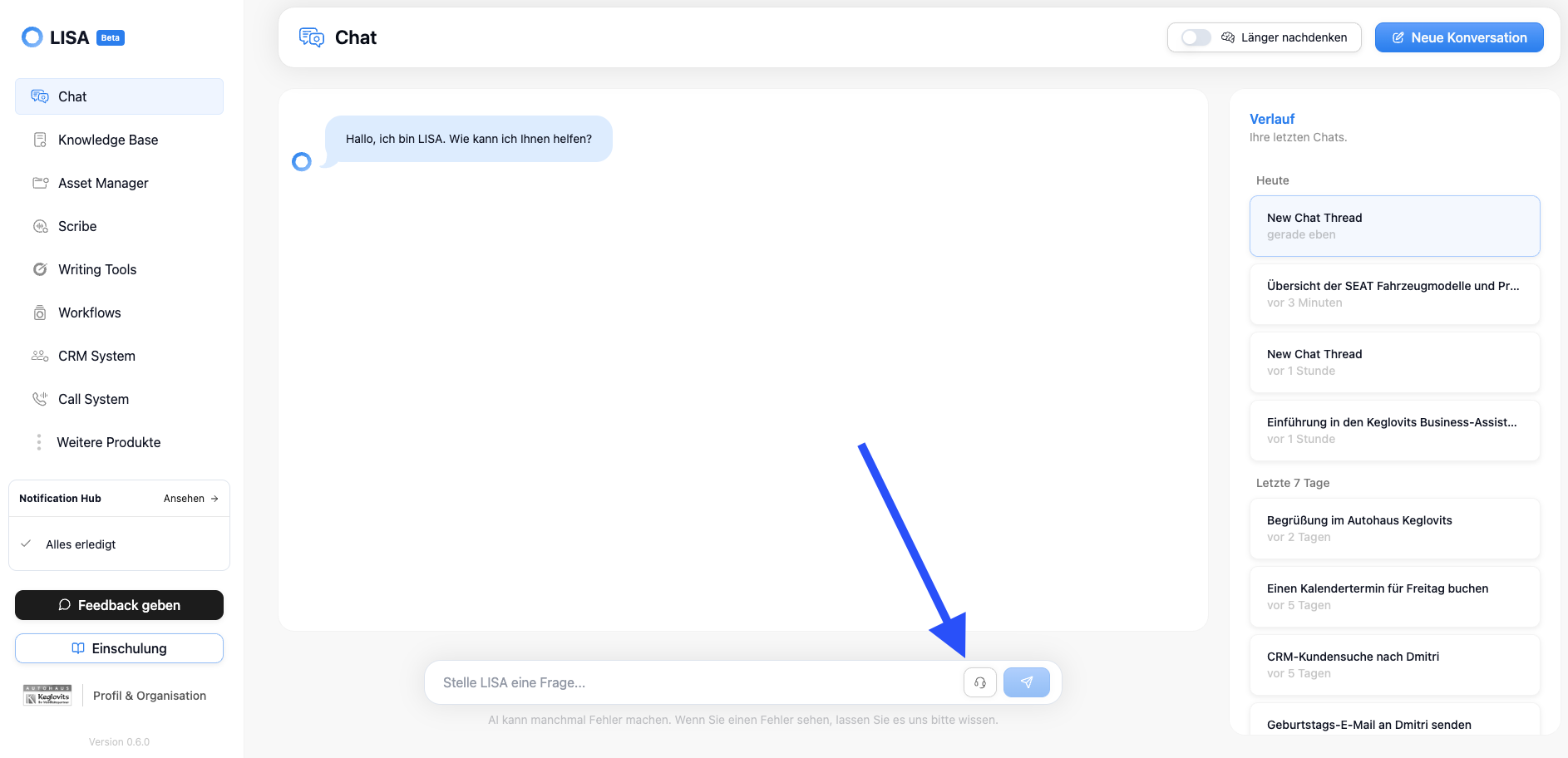
Voice in Chat offers two modes that you can switch between:
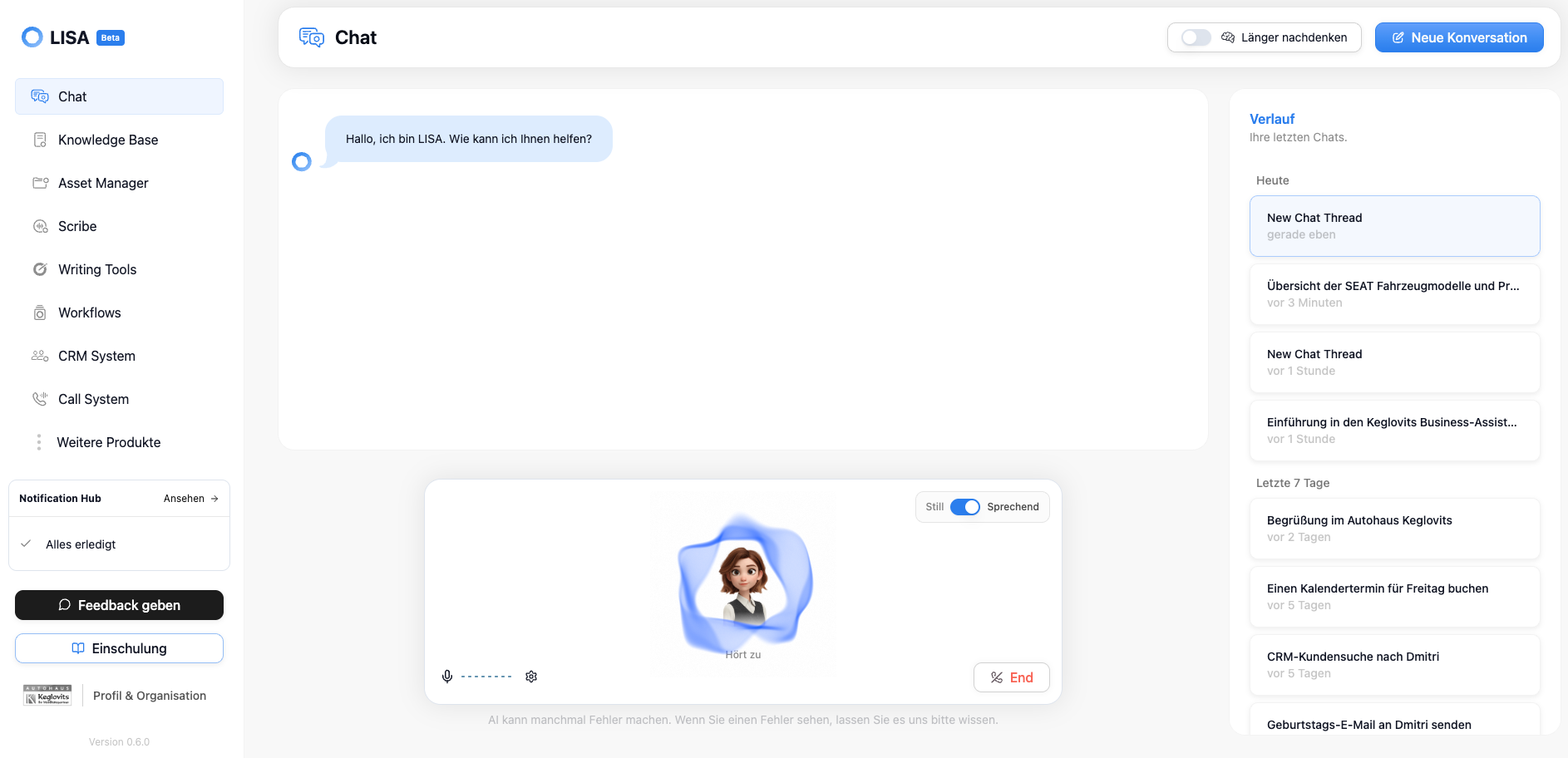
“Speaking” - Conversation Mode
Talk to LISA and she’ll respond verbally; you can also read along in the chat if you like. This mode is perfect for conversations when you’re alone in the office with LISA.
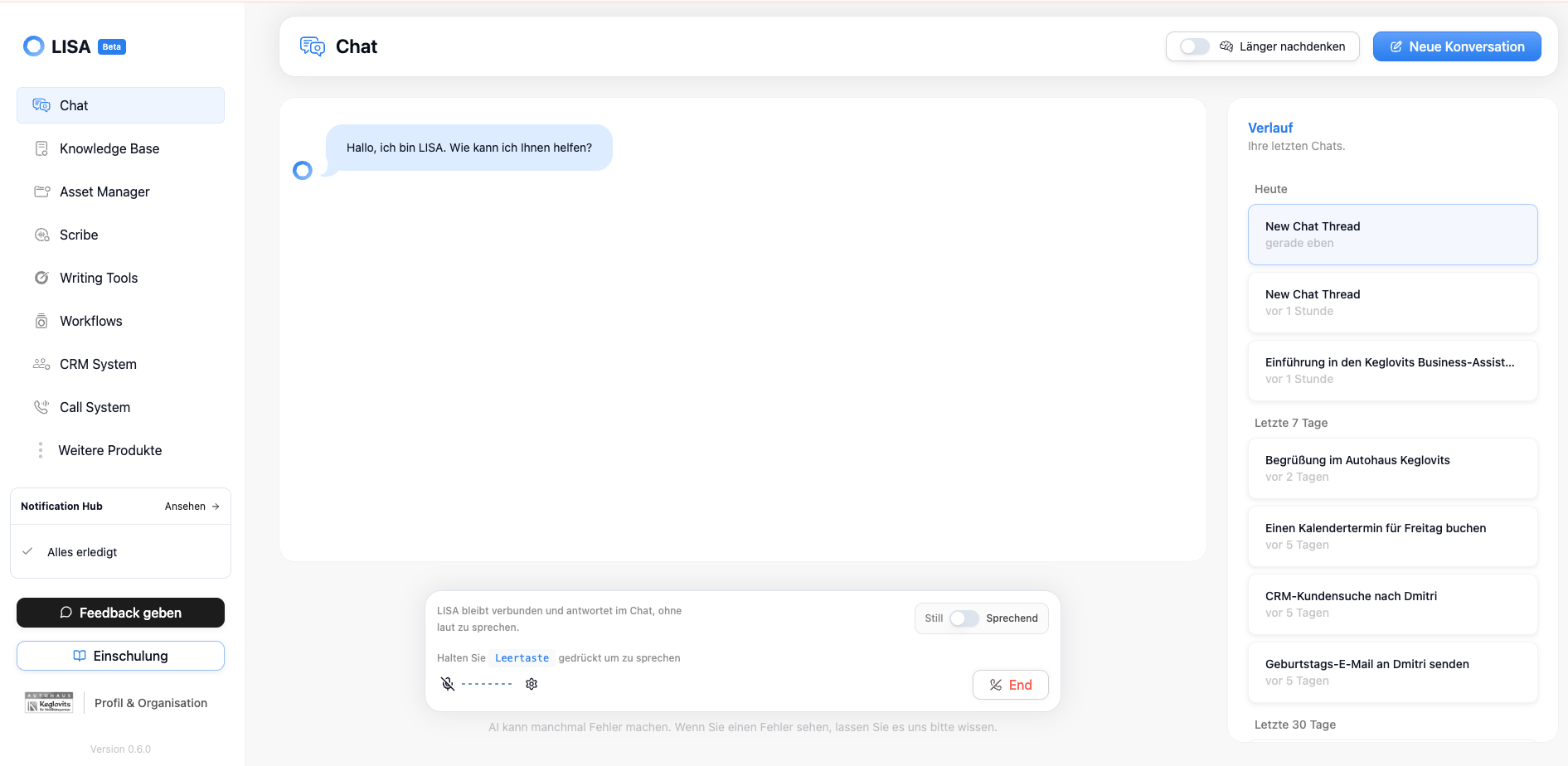
“Silent” - Meeting Mode
LISA listens whenever you hold down the spacebar; she doesn’t respond verbally, which is perfect for customer conversations where LISA is supposed to help (e.g., find information) but not interrupt
New Feature: Scribe Video
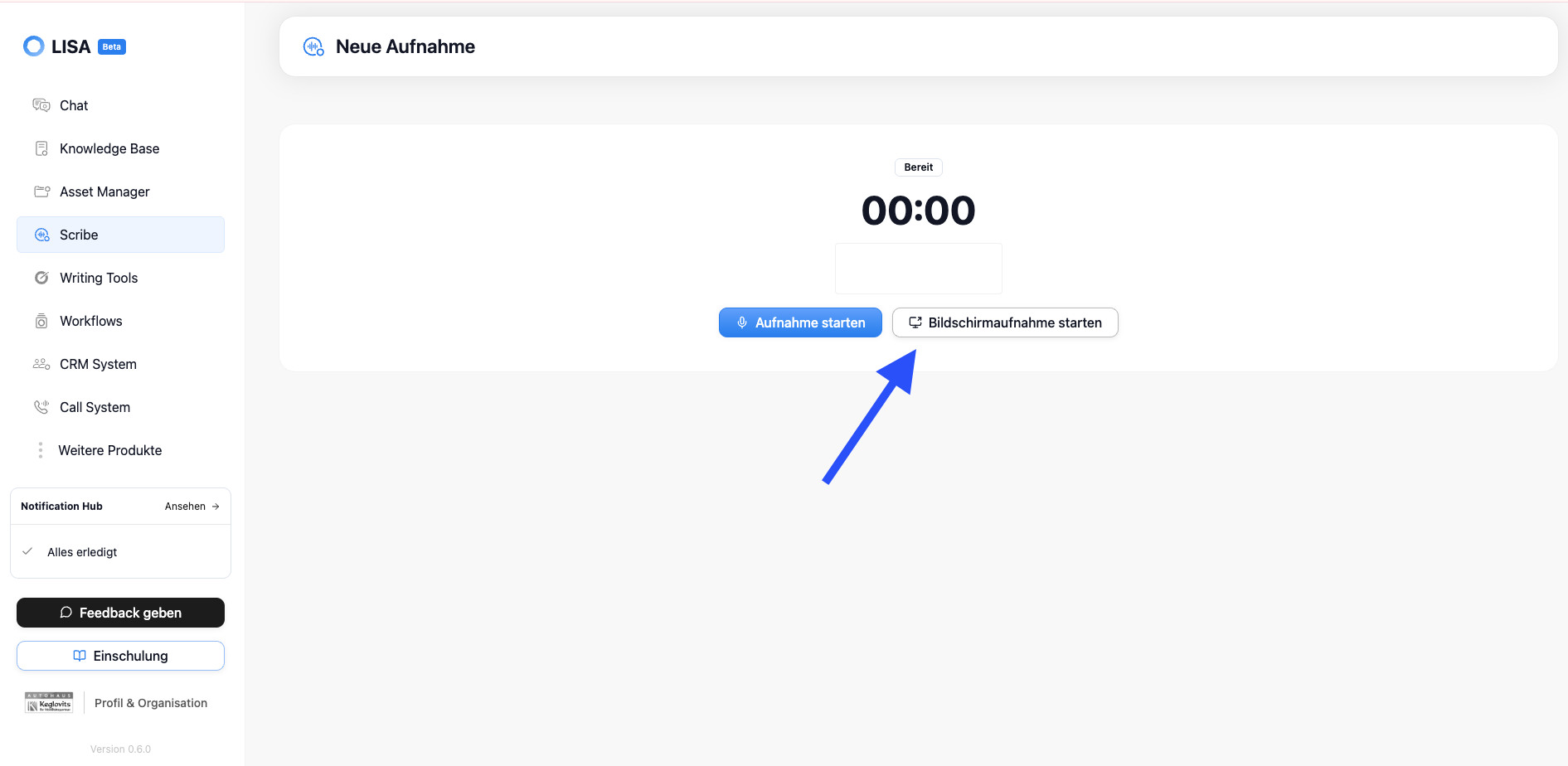
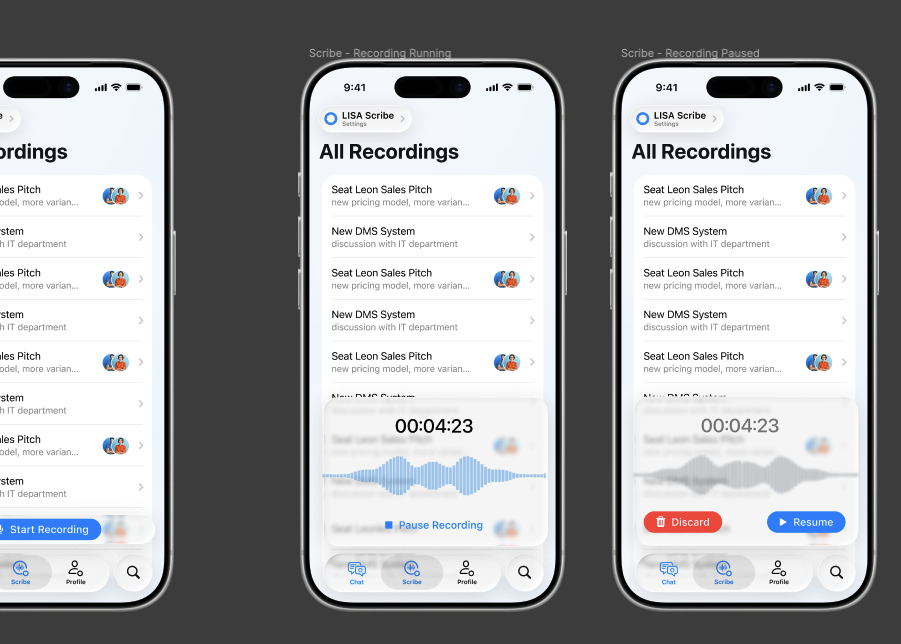
With Scribe Video, we’re expanding Scribe to include video-based content, thereby creating another source of documentable knowledge in LISA. Teams can capture and retrieve information from video formats in a more structured way and integrate it into existing knowledge and automation processes. Scribe Video is ideal for recording online meetings without missing a thing. LISA analyzes both the video content and, as usual, everything that is spoken during the recording. Scribe Video also makes it easy to record desktop audio.
New Feature: LISA Background Workflows
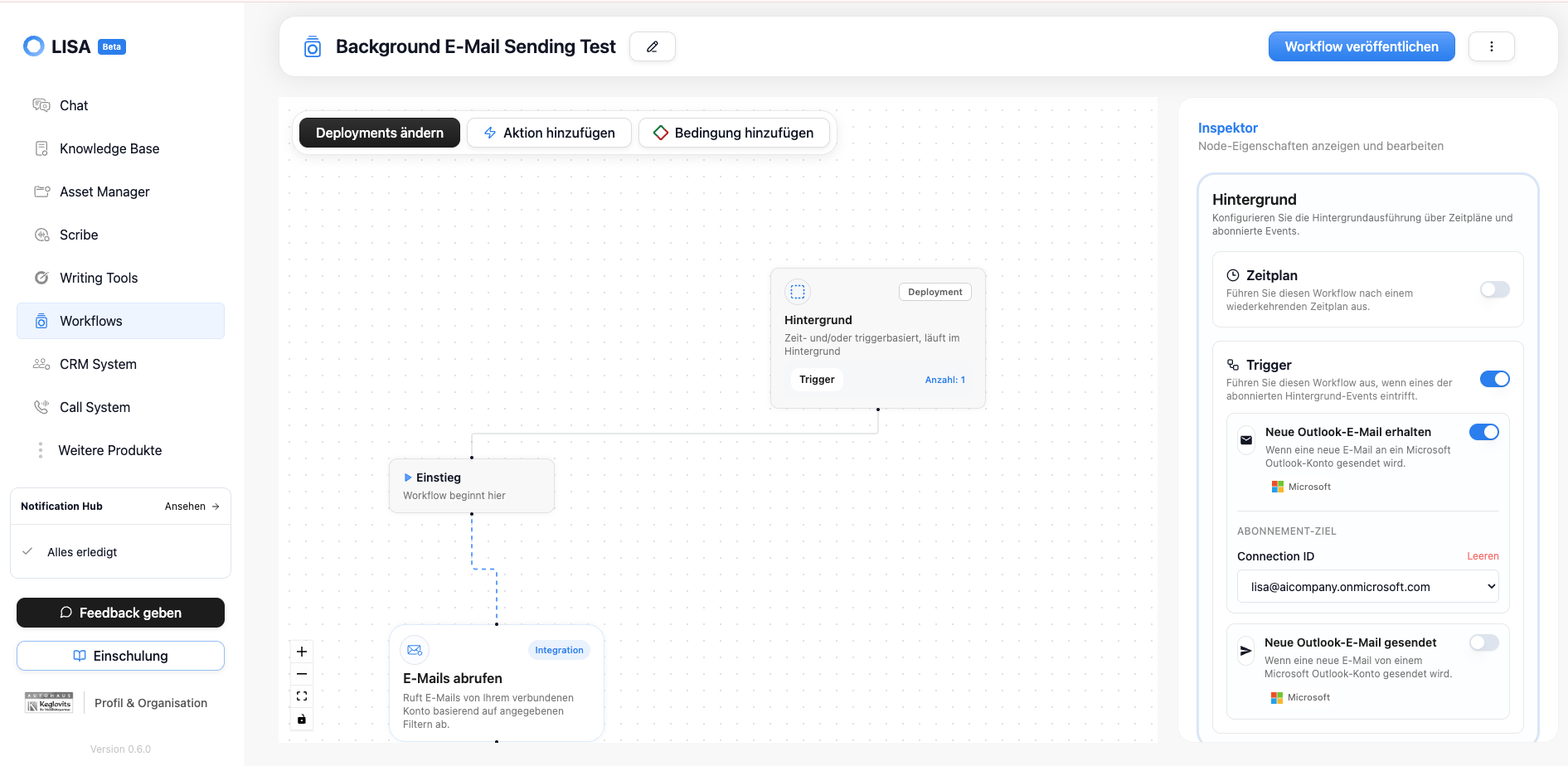
With the new background workflows, LISA can now execute processes autonomously in the background without requiring a human to actively run the workflow within the chat or call system. This allows for more reliable automation of recurring tasks and time-sensitive processes, which significantly reduces the workload on teams, especially in operational scenarios.
Background workflows can be executed in two ways:
Based on a schedule, e.g., (every morning, every Monday, ...)
Whenever “triggers” are detected—these triggers can be anything, such as “receiving a new email in Outlook”—we currently offer two Outlook triggers, and more triggers will be integrated into LISA in the future
LISA background workflows still operate on the “human-in-the-loop” principle, which means that LISA never performs any actions that modify data or transmit data externally (e.g., sending an email) without human approval.
New Feature: Notification Hub
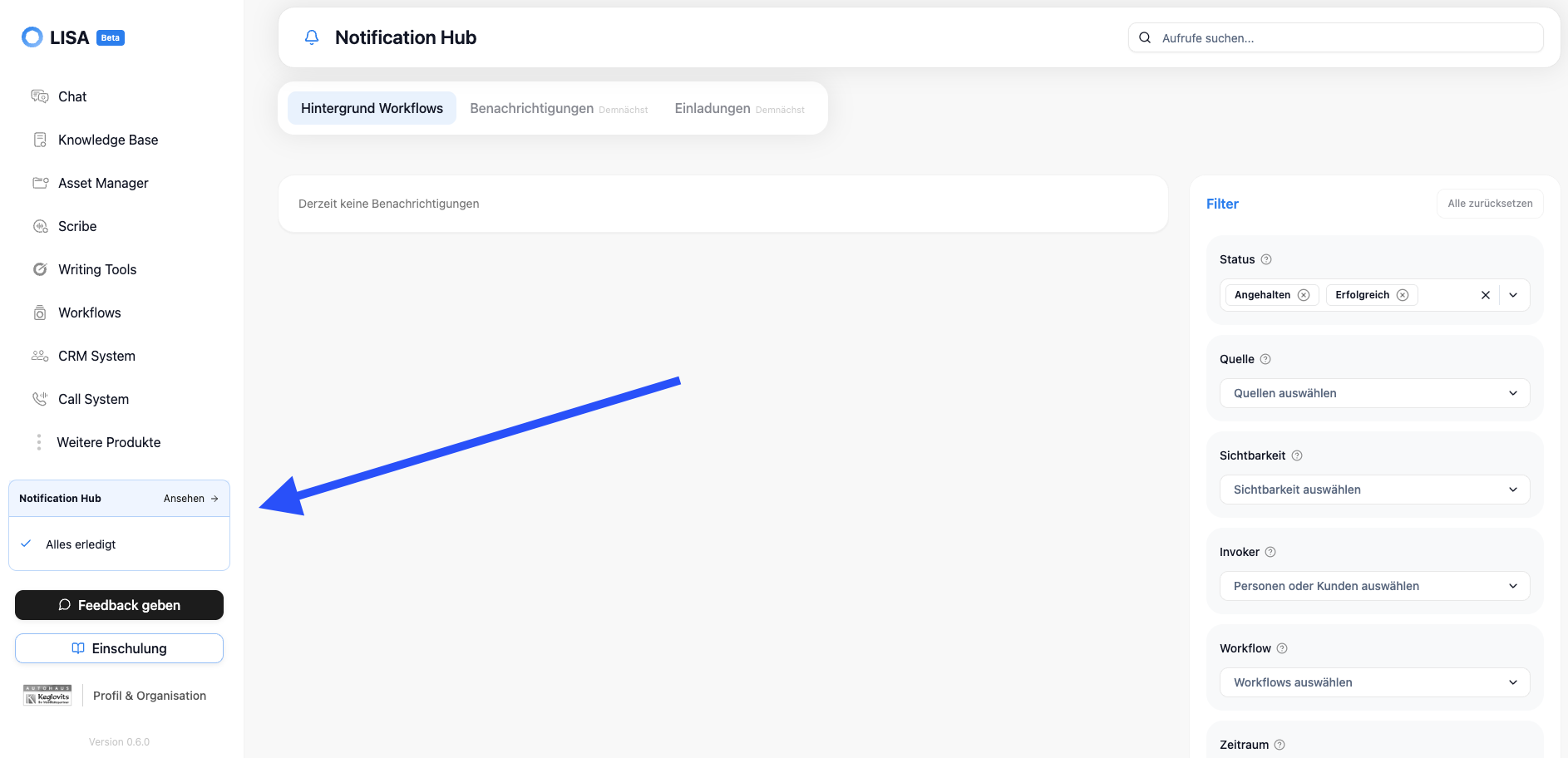
The new Notification Hub consolidates relevant system and workflow events in one central location. This allows users to quickly identify what requires their attention, set priorities more effectively, and remain in control even when multiple tasks are running simultaneously. This is the central location where LISA background workflows can be viewed and resumed.
The Notification Hub can be found in the page navigation; clicking on it takes you to the relevant subpage.
New: Action bar and source references in chat
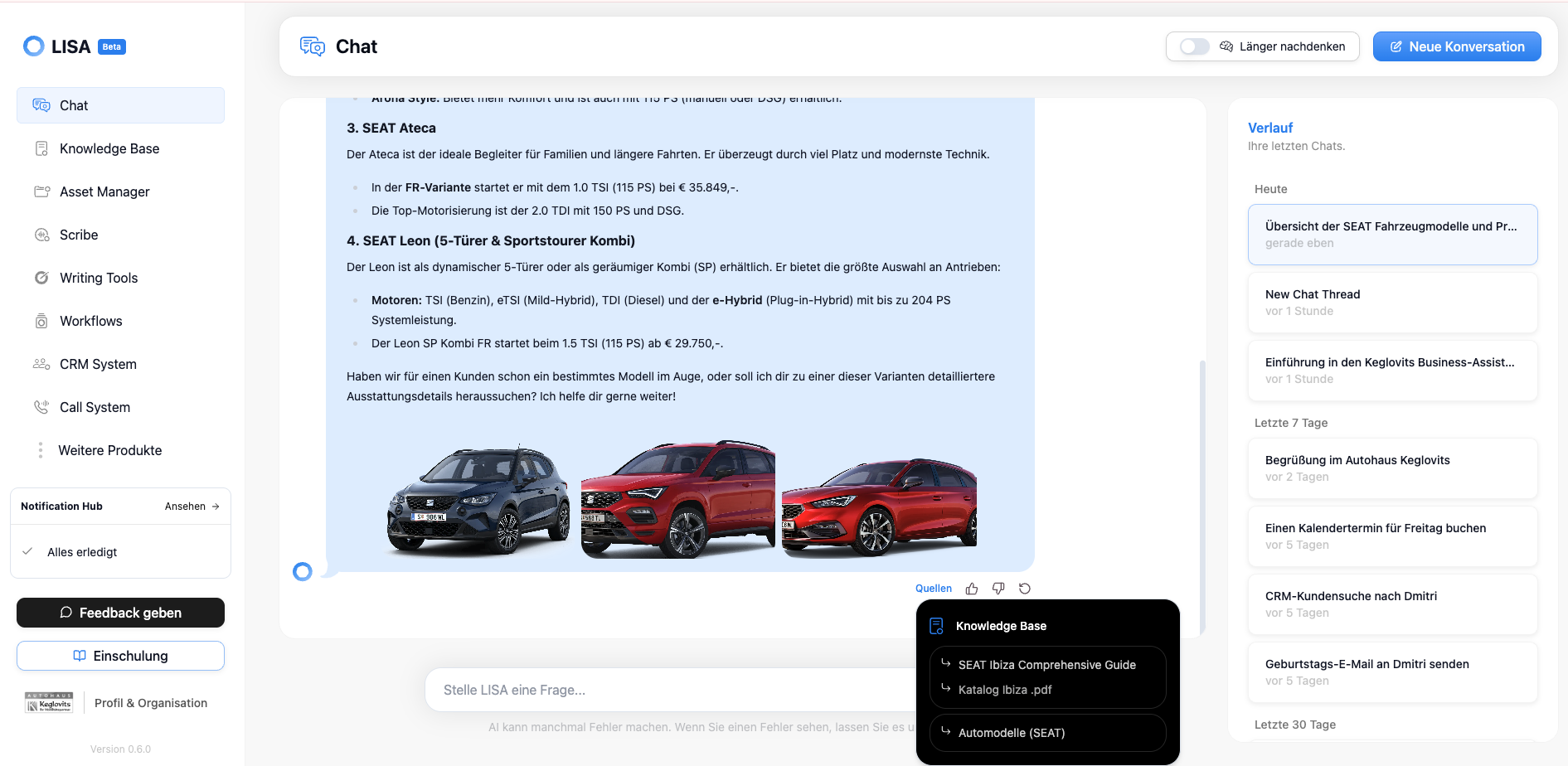
The new action bar in the chat (below every message LISA responds to) brings key interactions directly into the chat context and reduces friction in daily use. In addition, source citations provide greater transparency regarding the origin of responses: Knowledge Base and Scribe sources make references visible, while upvote/downvote and feedback features support quality assurance and continuous improvement in the dialogue.
New Workflow Actions
With version 0.7, the action portfolio expands significantly and covers additional core operational workflows. These new actions make LISA more flexible in day-to-day operations and reduce the need for manual intermediate steps across various external tools.
Action: Edit Context Unit
This action displays targeted changes to an existing context unit as a preview first and applies them only after confirmation. This allows content to be updated safely and transparently.
Action: Create Context Unit
This action generates an editable draft context from a prompt, which can be reviewed before finalization. This allows for the faster and more structured development of a new knowledge base.
Action: Create PDF
This action generates a PDF from a prompt, including title and visibility checks before generation. This simplifies the creation and storage of documents in the Asset Manager.
Action: Find File
This action searches the Asset Manager for relevant files and returns results that include summaries and links. This makes information easier to find and ready to use.
Action: Retrieve Reviews
This action imports reviews from a selected Google Business Profile location directly into the work context. This makes customer reviews available in LISA without any disruption.
Action: Reply to review
This action publishes an AI-generated response to a selected Google review after a brief review. This speeds up response times and ensures consistent communication.
Action: Send confirmation SMS
This action automatically sends a confirmation text message after a workflow action is completed. This keeps customers and teams immediately informed of the current status.
Update: LISA Call System
The call system has been improved in several key areas and further optimized for operational use. Overall, this makes telephone interactions more robust, faster, and better suited for international and more complex routing scenarios.
Multilingual support
The call system now better supports multilingual scenarios and can handle interactions with greater linguistic consistency. This makes communication significantly more flexible for international teams and customer groups. LISA currently supports English and German; in the future, we may be able to support other languages as well, but this would require testing and, ideally, a separate phone number dedicated to handling those languages.
Multiple forwarding numbers
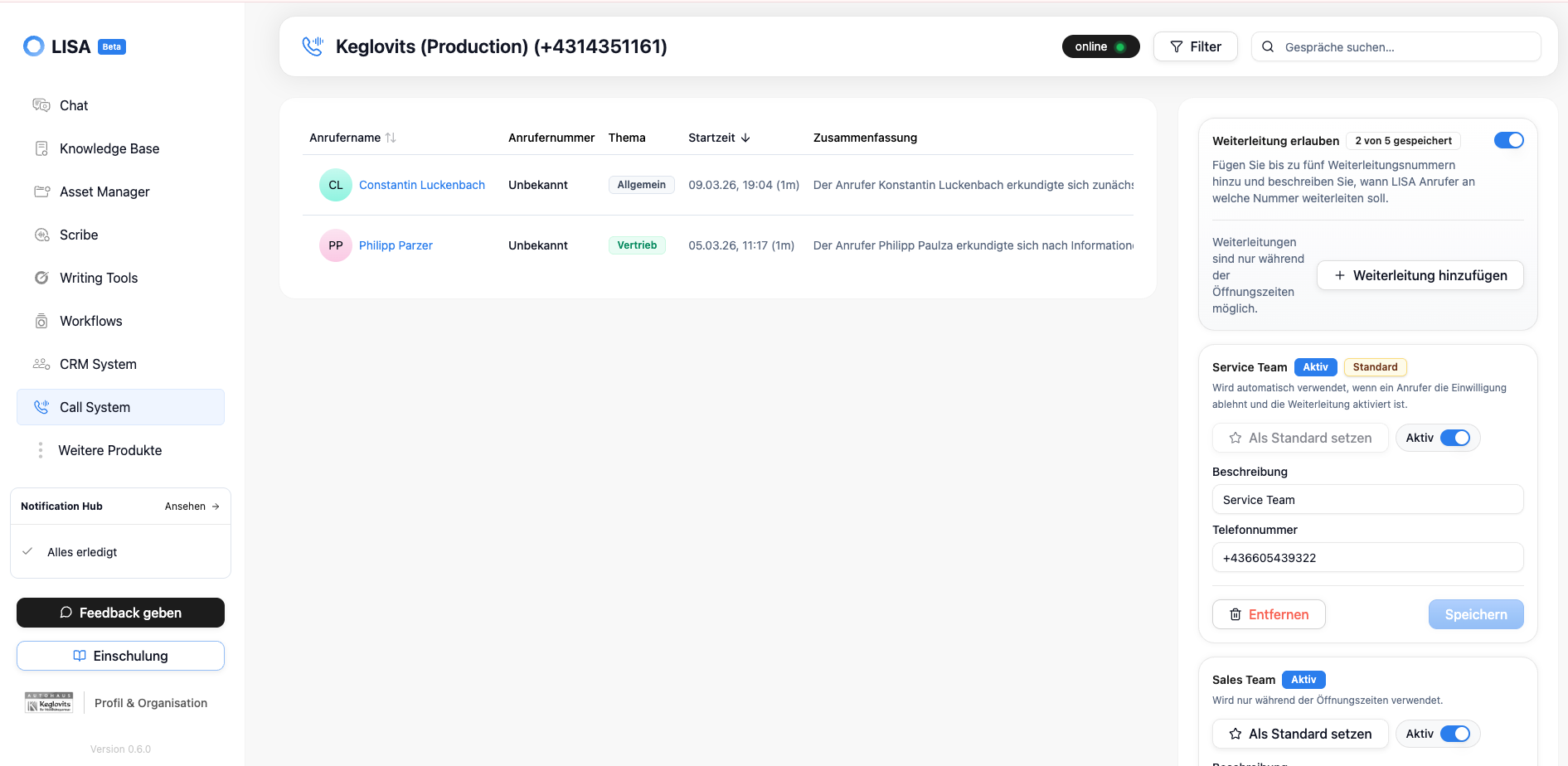
With advanced call forwarding options, you can manage multiple forwarding numbers per phone number in a more organized way. This allows callers to be forwarded to the correct destination more accurately, depending on the situation.
Update: LISA Asset Manager
Version 0.7 of the LISA Asset Manager has been specifically enhanced to speed up upload processes and improve usability. This makes the day-to-day import of large or numerous assets more organized and efficient.
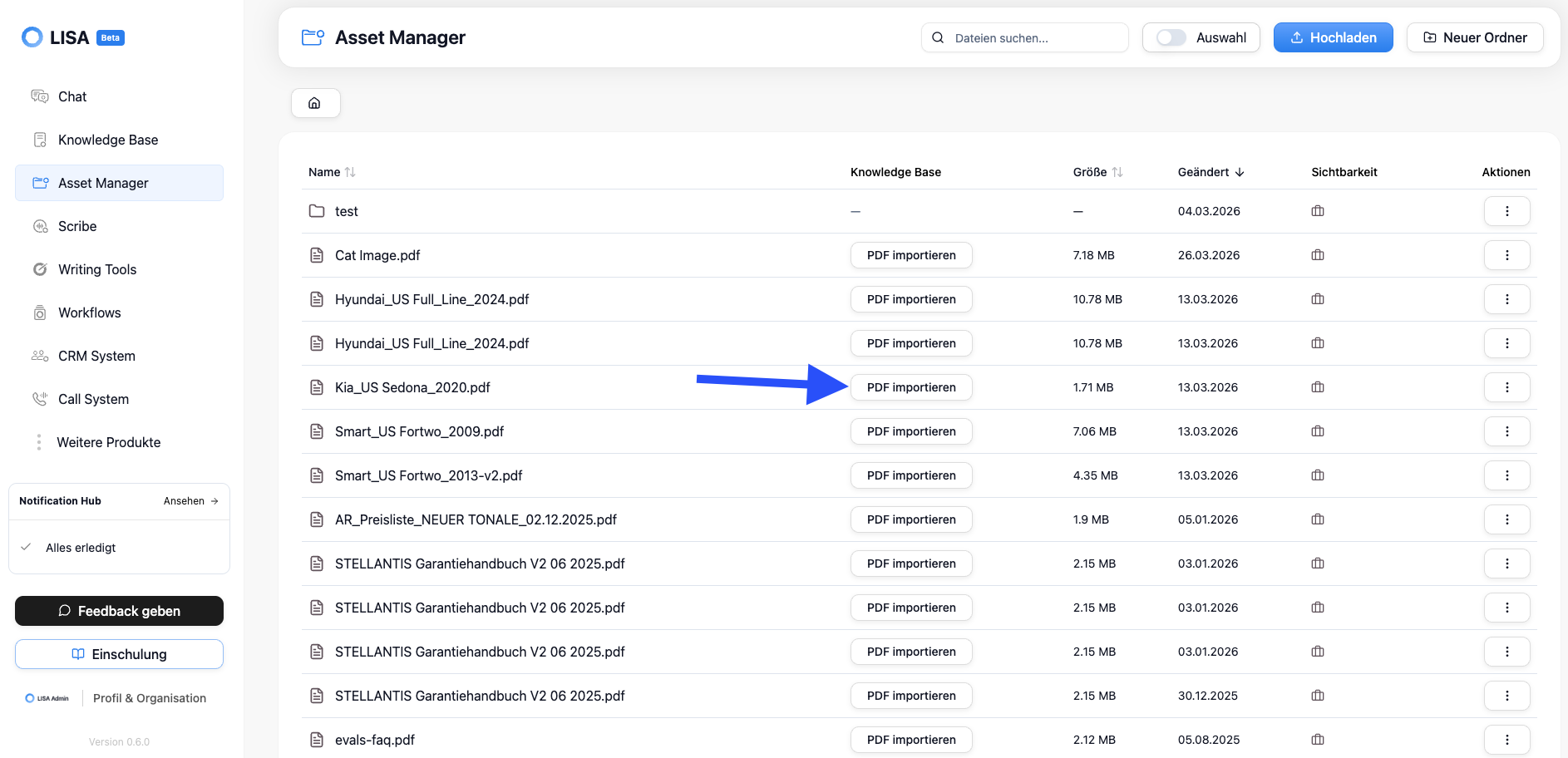
Quick Import
With Quick Import, you can start the upload process much faster and with fewer clicks. This allows teams to capture files more quickly and integrate them directly into their operational workflows.
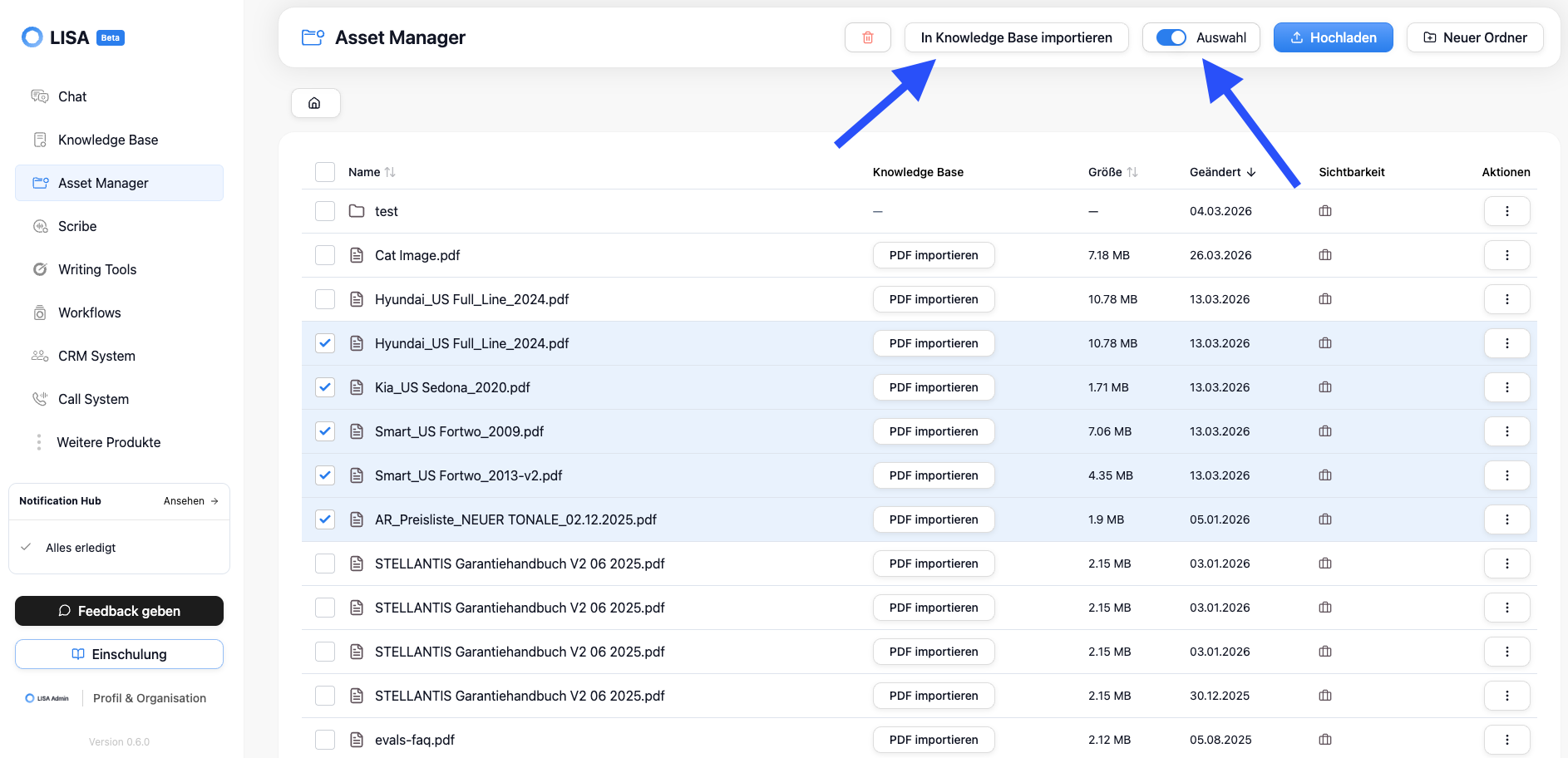
UX improvements during import
Additional UX optimizations make the import process easier to understand and reduce friction during recurring tasks. This improves usability, especially when dealing with large volumes of uploads.
Update: LISA CRM
Version 0.7 of LISA CRM also includes important enhancements designed to further improve data quality and operational speed. This offers clear advantages, particularly when it comes to multilingual communication and the onboarding of existing data.
Preferred language
The preferred language field allows customer data to be used more effectively for multilingual communication. This helps ensure that interactions are conducted more consistently in the appropriate language and helps LISA determine how the customer prefers to be addressed (in the call system and, in the future, also in the GO app and website plugin).
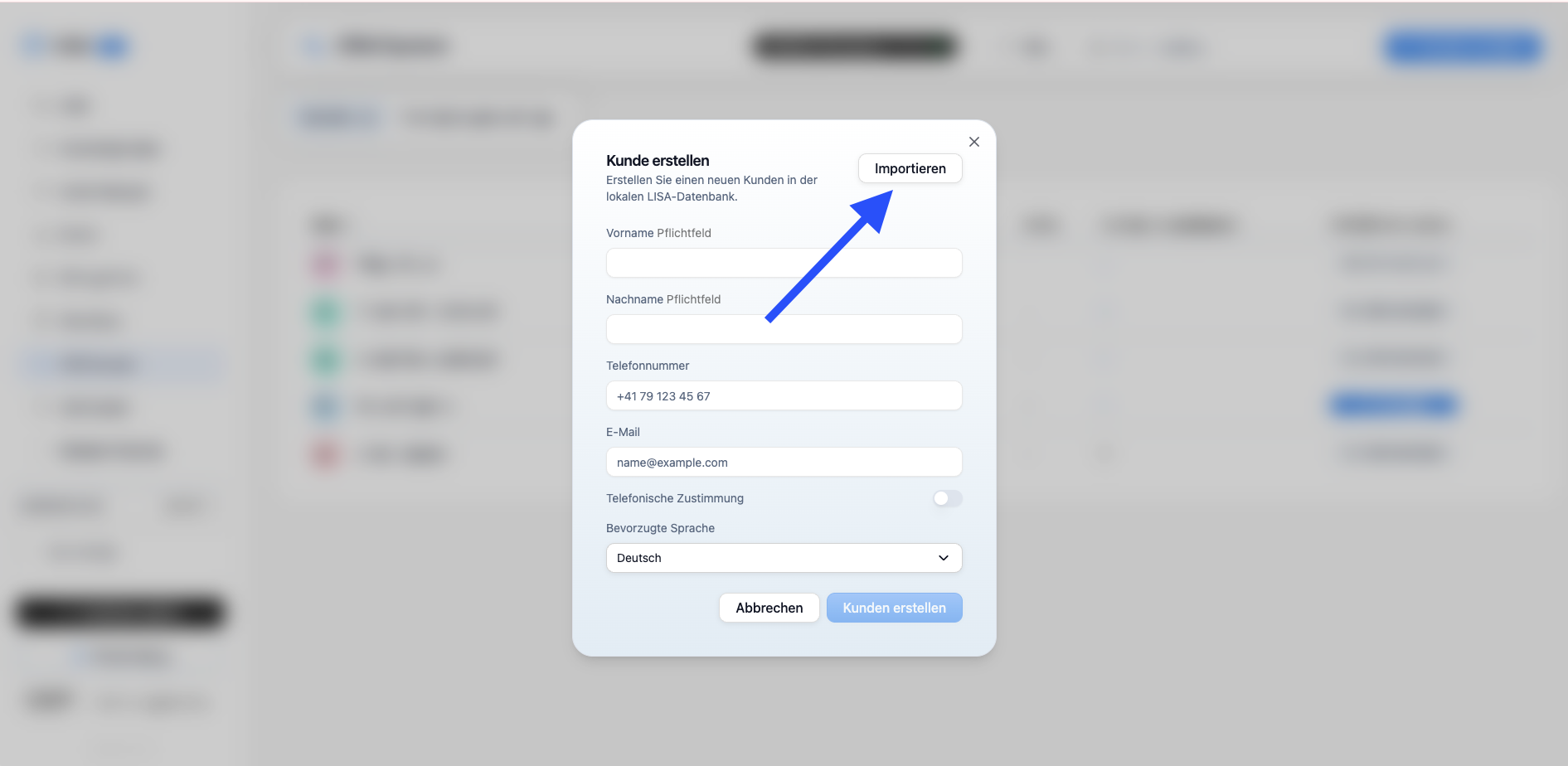
Quick Import for CSV and XLSX
New quick import options for CSV and XLSX files significantly speed up the process of importing existing customer data. This reduces the manual effort required for data import and improves time-to-value in the CRM.
New Connected Accounts Options
The Connected Accounts feature has been expanded to include additional options: SMTP and Microsoft Exchange. This makes it easier to connect existing communication infrastructures, and allows companies to better integrate LISA into their established email and messaging processes. For both options, you will typically need to work with your IT team to set up the integration.
Start of development: LISA Go app
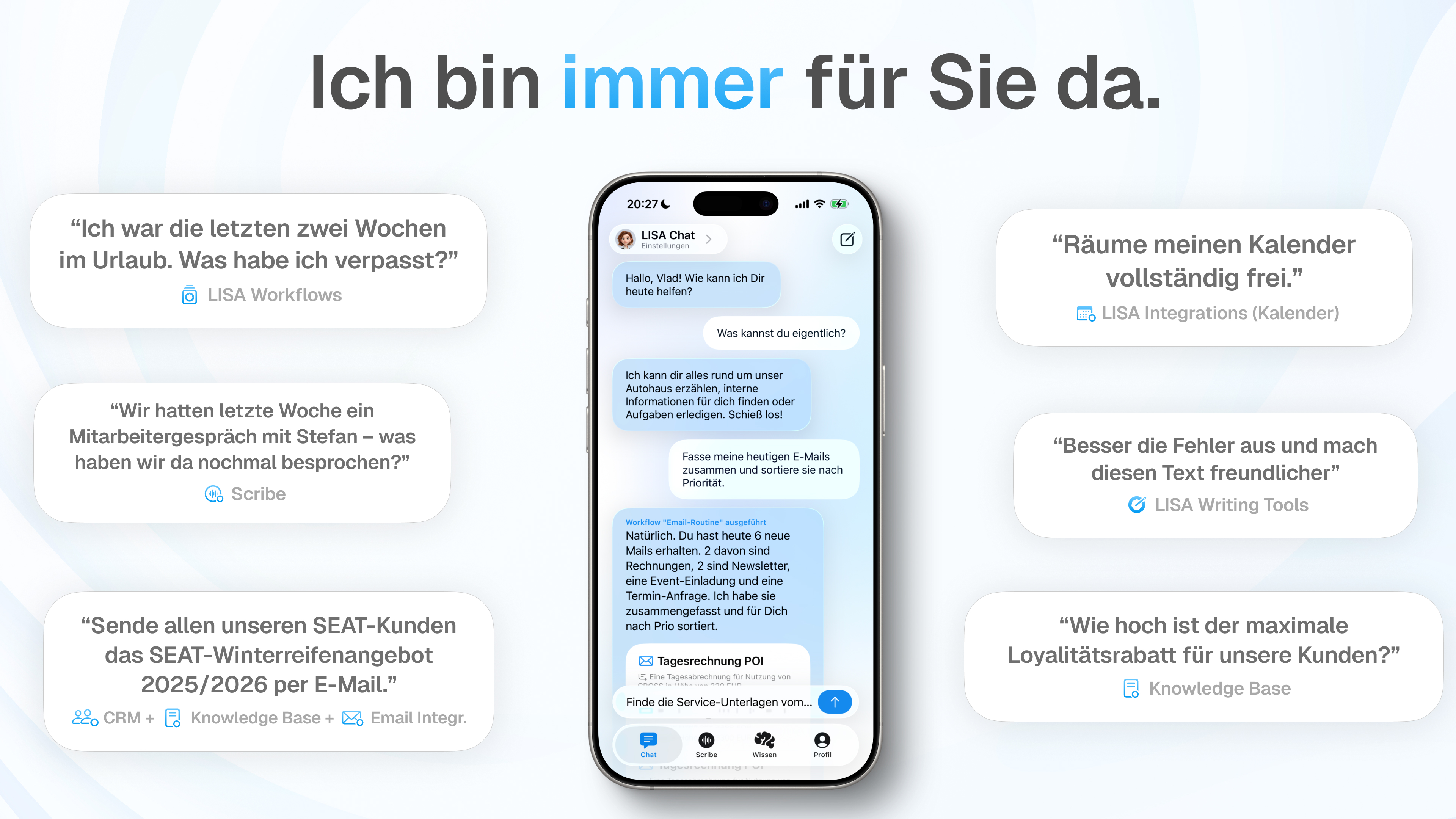
With version 0.7, we are launching the app development for LISA Go. In this phase, the focus is on product design, user experience concepts, and team building, in order to strategically prepare for the mobile use of LISA and gradually translate these efforts into concrete features in upcoming releases.
Bug fixes and improvements
In addition to the new features, version 0.7 includes numerous stability and performance improvements:
Dashboard navigation is now 3x faster (up to 20x faster in some cases)..
Fixed slow or crashing chats with long histories.
Stabilized calendar lookups on mobile devices.
Fixed Scribe uploads for long recordings.
Made bulk uploads of large files more robust.
Implemented additional minor improvements that enhance overall stability and user experience across the entire system.
Thanks for reading, and see you next month!
With version 0.7, we are continuing to expand LISA. This release focuses primarily on the new voice experience in chat, the productive launch of background workflows, a new notification hub, significant enhancements to chat interactions, and a major expansion of our action ecosystem. In addition, we have further optimized core systems such as the call system, asset manager, and CRM, while also laying the groundwork for the LISA Go app.
New Feature: Voice Mode in LISA Chat
With Voice in Chat, users can now interact with LISA even more naturally and enter requests by speaking rather than just typing. This improves usability in situations where speed and hands-free interaction are important, and creates a seamless bridge between chat- and call-based workflows.
To activate voice mode, simply tap the “headset icon” on the LISA chat bar

Voice in Chat offers two modes that you can switch between:
“Speaking” - Conversation Mode
Talk to LISA and she’ll respond verbally; you can also read along in the chat if you like. This mode is perfect for conversations when you’re alone in the office with LISA.

“Silent” - Meeting Mode
LISA listens whenever you hold down the spacebar; she doesn’t respond verbally, which is perfect for customer conversations where LISA is supposed to help (e.g., find information) but not interrupt

New Feature: Scribe Video
With Scribe Video, we’re expanding Scribe to include video-based content, thereby creating another source of documentable knowledge in LISA. Teams can capture and retrieve information from video formats in a more structured way and integrate it into existing knowledge and automation processes. Scribe Video is ideal for recording online meetings without missing a thing. LISA analyzes both the video content and, as usual, everything that is spoken during the recording. Scribe Video also makes it easy to record desktop audio.
New Feature: LISA Background Workflows
With the new background workflows, LISA can now execute processes autonomously in the background without requiring a human to actively run the workflow within the chat or call system. This allows for more reliable automation of recurring tasks and time-sensitive processes, which significantly reduces the workload on teams, especially in operational scenarios.
Background workflows can be executed in two ways:
Based on a schedule, e.g., (every morning, every Monday, ...)
Whenever “triggers” are detected—these triggers can be anything, such as “receiving a new email in Outlook”—we currently offer two Outlook triggers, and more triggers will be integrated into LISA in the future
LISA background workflows still operate on the “human-in-the-loop” principle, which means that LISA never performs any actions that modify data or transmit data externally (e.g., sending an email) without human approval.
New Feature: Notification Hub
The new Notification Hub consolidates relevant system and workflow events in one central location. This allows users to quickly identify what requires their attention, set priorities more effectively, and remain in control even when multiple tasks are running simultaneously. This is the central location where LISA background workflows can be viewed and resumed.
The Notification Hub can be found in the page navigation; clicking on it takes you to the relevant subpage.

New: Action bar and source references in chat
The new action bar in the chat (below every message LISA responds to) brings key interactions directly into the chat context and reduces friction in daily use. In addition, source citations provide greater transparency regarding the origin of responses: Knowledge Base and Scribe sources make references visible, while upvote/downvote and feedback features support quality assurance and continuous improvement in the dialogue.

New Workflow Actions
With version 0.7, the action portfolio expands significantly and covers additional core operational workflows. These new actions make LISA more flexible in day-to-day operations and reduce the need for manual intermediate steps across various external tools.
Action: Edit Context Unit
This action displays targeted changes to an existing context unit as a preview first and applies them only after confirmation. This allows content to be updated safely and transparently.
Action: Create Context Unit
This action generates an editable draft context from a prompt, which can be reviewed before finalization. This allows for the faster and more structured development of a new knowledge base.
Action: Create PDF
This action generates a PDF from a prompt, including title and visibility checks before generation. This simplifies the creation and storage of documents in the Asset Manager.
Action: Find File
This action searches the Asset Manager for relevant files and returns results that include summaries and links. This makes information easier to find and ready to use.
Action: Retrieve Reviews
This action imports reviews from a selected Google Business Profile location directly into the work context. This makes customer reviews available in LISA without any disruption.
Action: Reply to review
This action publishes an AI-generated response to a selected Google review after a brief review. This speeds up response times and ensures consistent communication.
Action: Send confirmation SMS
This action automatically sends a confirmation text message after a workflow action is completed. This keeps customers and teams immediately informed of the current status.
Update: LISA Call System
The call system has been improved in several key areas and further optimized for operational use. Overall, this makes telephone interactions more robust, faster, and better suited for international and more complex routing scenarios.
Multilingual support
The call system now better supports multilingual scenarios and can handle interactions with greater linguistic consistency. This makes communication significantly more flexible for international teams and customer groups. LISA currently supports English and German; in the future, we may be able to support other languages as well, but this would require testing and, ideally, a separate phone number dedicated to handling those languages.
Multiple forwarding numbers
With advanced call forwarding options, you can manage multiple forwarding numbers per phone number in a more organized way. This allows callers to be forwarded to the correct destination more accurately, depending on the situation.

Update: LISA Asset Manager
Version 0.7 of the LISA Asset Manager has been specifically enhanced to speed up upload processes and improve usability. This makes the day-to-day import of large or numerous assets more organized and efficient.
Quick Import
With Quick Import, you can start the upload process much faster and with fewer clicks. This allows teams to capture files more quickly and integrate them directly into their operational workflows.

UX improvements during import
Additional UX optimizations make the import process easier to understand and reduce friction during recurring tasks. This improves usability, especially when dealing with large volumes of uploads.

Update: LISA CRM
Version 0.7 of LISA CRM also includes important enhancements designed to further improve data quality and operational speed. This offers clear advantages, particularly when it comes to multilingual communication and the onboarding of existing data.
Preferred language
The preferred language field allows customer data to be used more effectively for multilingual communication. This helps ensure that interactions are conducted more consistently in the appropriate language and helps LISA determine how the customer prefers to be addressed (in the call system and, in the future, also in the GO app and website plugin).
Quick Import for CSV and XLSX
New quick import options for CSV and XLSX files significantly speed up the process of importing existing customer data. This reduces the manual effort required for data import and improves time-to-value in the CRM.

New Connected Accounts Options
The Connected Accounts feature has been expanded to include additional options: SMTP and Microsoft Exchange. This makes it easier to connect existing communication infrastructures, and allows companies to better integrate LISA into their established email and messaging processes. For both options, you will typically need to work with your IT team to set up the integration.
Start of development: LISA Go app
With version 0.7, we are launching the app development for LISA Go. In this phase, the focus is on product design, user experience concepts, and team building, in order to strategically prepare for the mobile use of LISA and gradually translate these efforts into concrete features in upcoming releases.


Bug fixes and improvements
In addition to the new features, version 0.7 includes numerous stability and performance improvements:
Dashboard navigation is now 3x faster (up to 20x faster in some cases)..
Fixed slow or crashing chats with long histories.
Stabilized calendar lookups on mobile devices.
Fixed Scribe uploads for long recordings.
Made bulk uploads of large files more robust.
Implemented additional minor improvements that enhance overall stability and user experience across the entire system.
Thanks for reading, and see you next month!