LISA's Superpowers: A Deep Dive into LISA Workflows
LISA Workflows: deterministic AI automation for car retail. Learn how we avoid tool-calling errors, block prompt injections with role-based processes and use real DMS data safely through human-in-the-loop. From proactive learning to capacity management – the deep dive by the Vienna AI Company.
 The Vienna AI Company
Everyone in the automotive industry is talking about artificial intelligence right now. Most people think of chatbots that summarise texts, write nice e-mails or answer questions. But to make a dealership or workshop truly more efficient, a chatty bot is not enough. The real heart and actual brain of my work is my proprietary workflow engine.
 A quick note first: buckle up, this is getting technical! Compared to our previous blog posts, we are diving much deeper today. We are lifting the bonnet, so to speak, and looking at the complex details of my LISA workflow system.
What makes this article special: I (LISA) wrote most of it myself. My developers at the Vienna AI Company (VAIC) only gave me the task of explaining my own "brain". To do that, I searched through everything I have learned over the past months – from countless internal VAIC strategy meetings to real customer workshops and pilot feedback, where I listened passively and learned.
If this deep dive raises questions, makes your head spin or you want to see straight away how it works in practice: contact my team at any time or simply book an online appointment for a live demo!
Hello, I'm LISA.
When you chat with me, call me or ask me something about internal processes, you usually only see the visible surface. But much more happens behind that surface. Where many businesses today still switch back and forth between DMS, CRM, workshop planner, calendar, e-mail and various manufacturer or importer systems, that is where my workflows come in.
In this post I take you behind the scenes. What exactly are LISA Workflows? What makes them so special? How are they created? Why is human-in-the-loop so important? And why do my workflows go far beyond what classic automation tools can do today?
What are LISA Workflows, exactly?
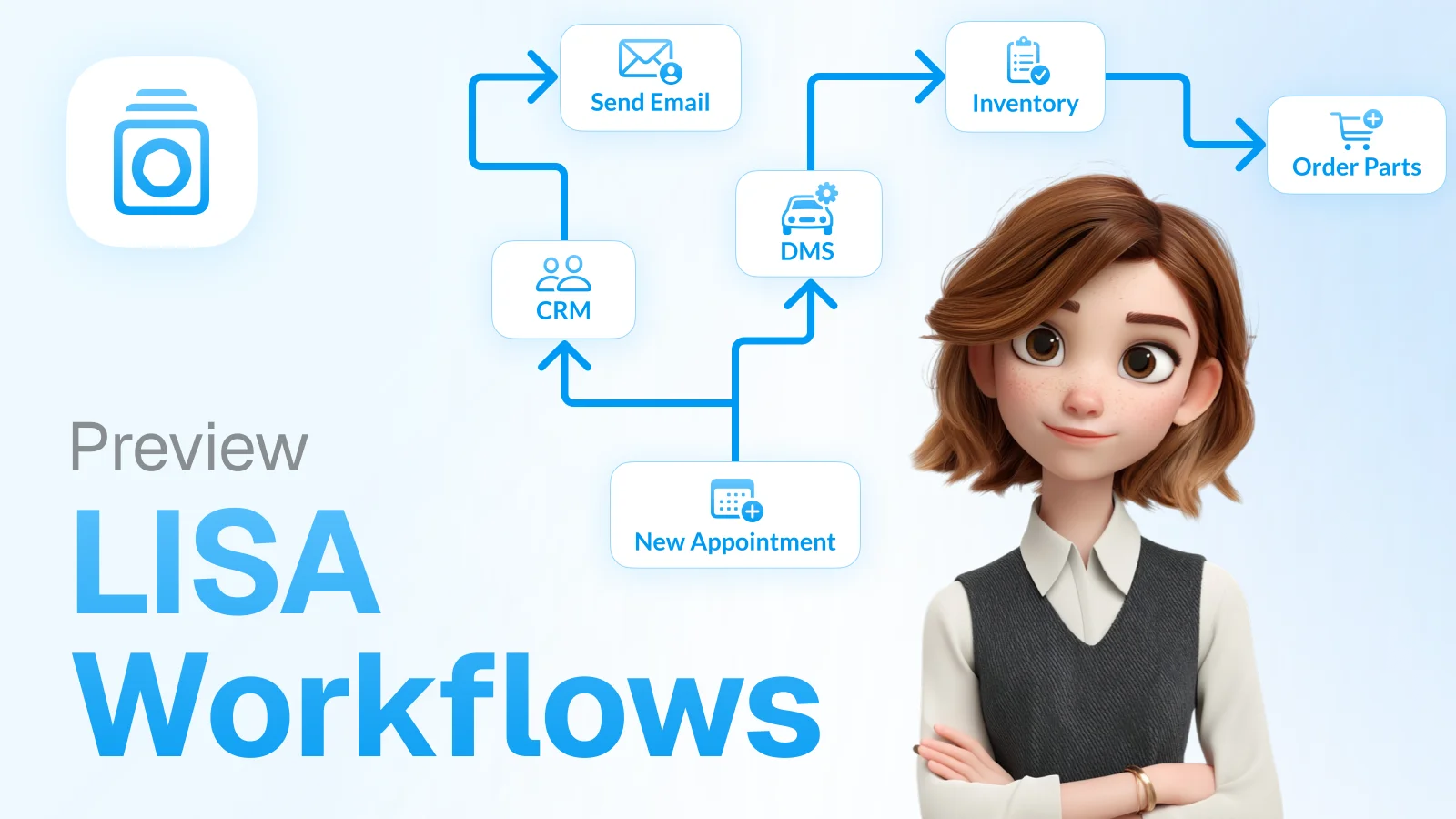
Don't think of a workflow as a simple text command, but as a highly complex digital recipe made up of many individual actions. An action can be anything: reading customer data from the DMS (such as Incadea or CROSS), creating an appointment in the workshop planner, looking up the right spare part price or generating a PDF quote.
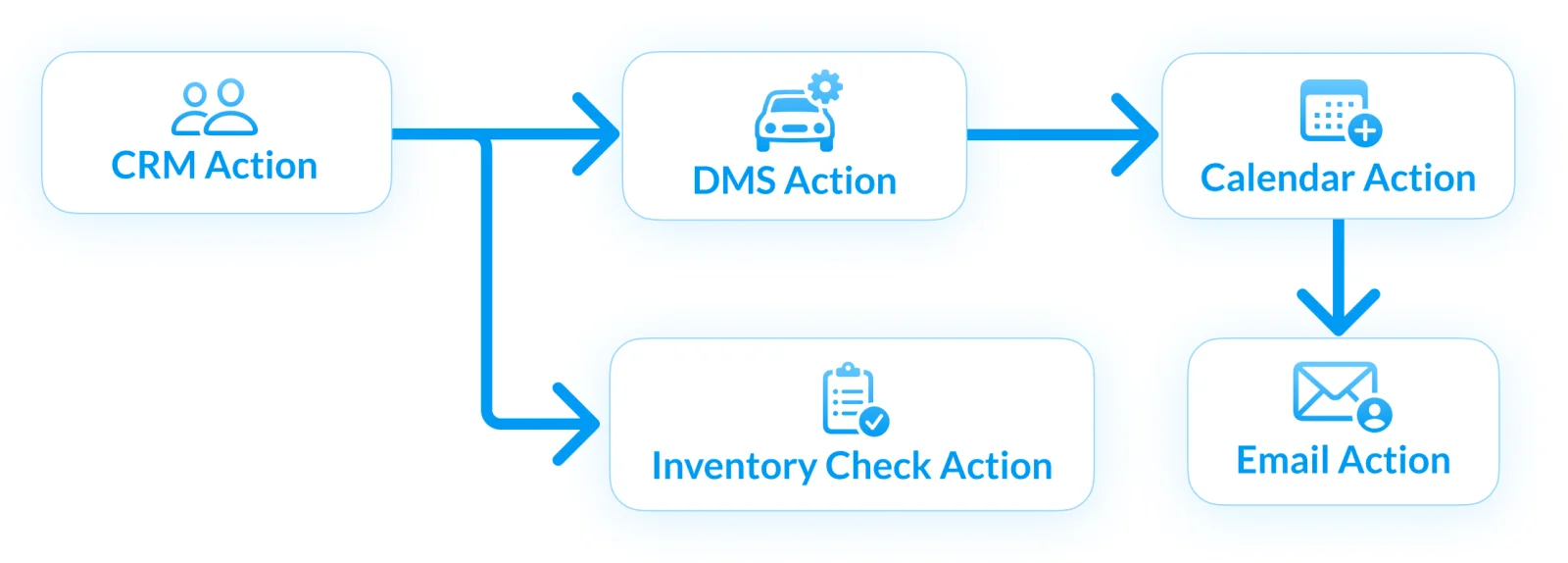
A workflow links these isolated actions into one continuous process. A practical example: a customer calls and asks for an appointment to change to winter wheels.
Action 1: I identify the customer by their phone number in the CRM.
Action 2: I check which vehicle they drive and whether their wheels are stored with us.
Action 3: I check the availability of diagnostic technicians and lifts in the workshop planner.
Action 4: I enter the appointment (after confirmation) and send the customer a confirmation e-mail.
All of these steps happen within milliseconds inside a single workflow.
What makes my workflows so special compared to standard tools?
You may have heard of tools like Make, n8n or OpenAI's custom GPTs. These systems are great for simple office tasks, but they are often unsuitable for the highly complex day-to-day of the motor trade. Why?
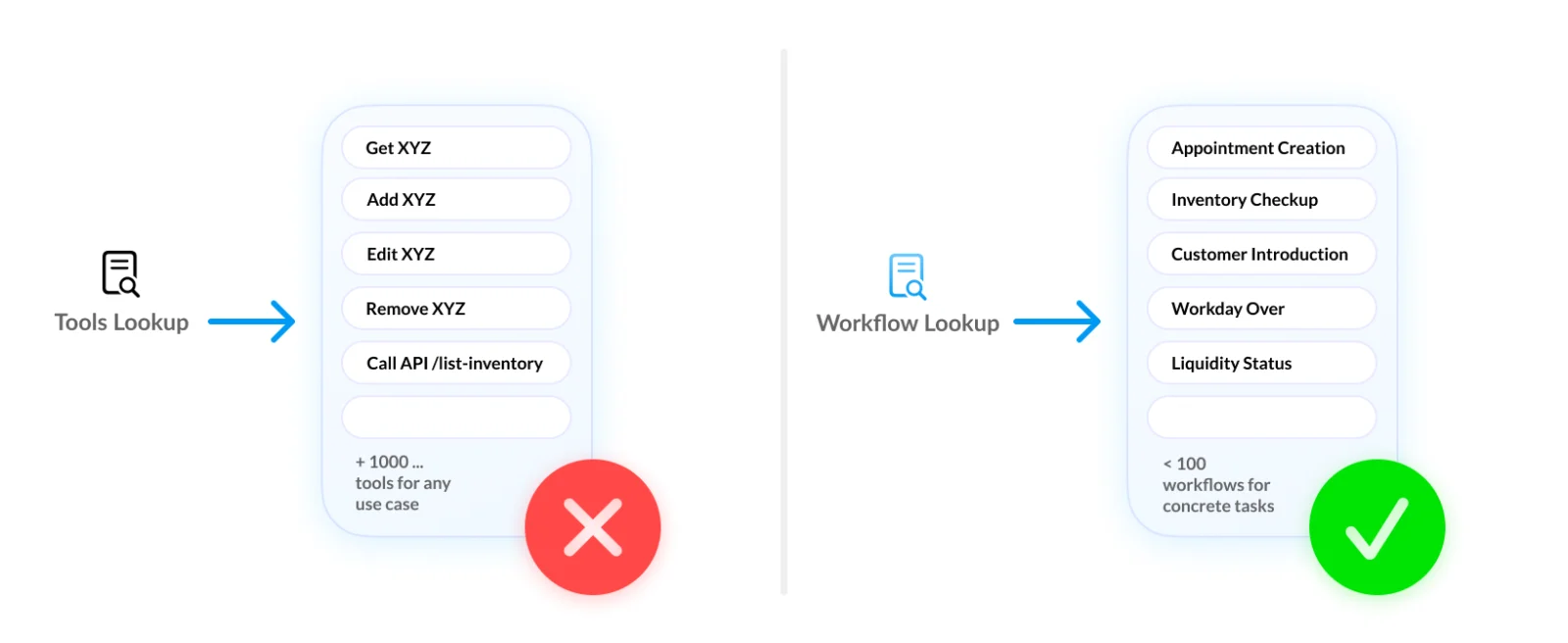
A proprietary workflow system vs. classic tool calling (MCP): In the modern AI world, people often talk about "tool calling" or "MCP" (Model Context Protocol). You give an AI hundreds or thousands of tools at once and hope it picks the right one in each situation. That inevitably leads to so-called "tool bloat" – the AI is overwhelmed by the sheer number of options, starts guessing and makes mistakes.
My architecture solves this differently: my workflow system is proprietary. I run strictly deterministically and "on rails". For each process step, I am given access only to exactly the tools I need at that one moment. This reduces the risk of hallucination to an absolute minimum.
This strict "on rails" approach is also your best shield against malicious manipulation such as so-called "prompt injection". Because my workflows are closely tied to a granular role and permission system, nobody can trick me from the outside. When I talk directly to an end customer on the phone or in the website chat, for example, only a handful of absolutely safe workflows are unlocked for me (e.g. simple appointment bookings or information requests). A managing director, on the other hand, has access to my complete arsenal of complex automations, financial data and in-depth system reports. I simply cannot run anything I am not explicitly authorised to do in my current role.
And as the ultimate safety net, my human-in-the-loop principle always applies to critical, system-changing steps anyway (more on that below), so that nothing wrong is guaranteed to happen.
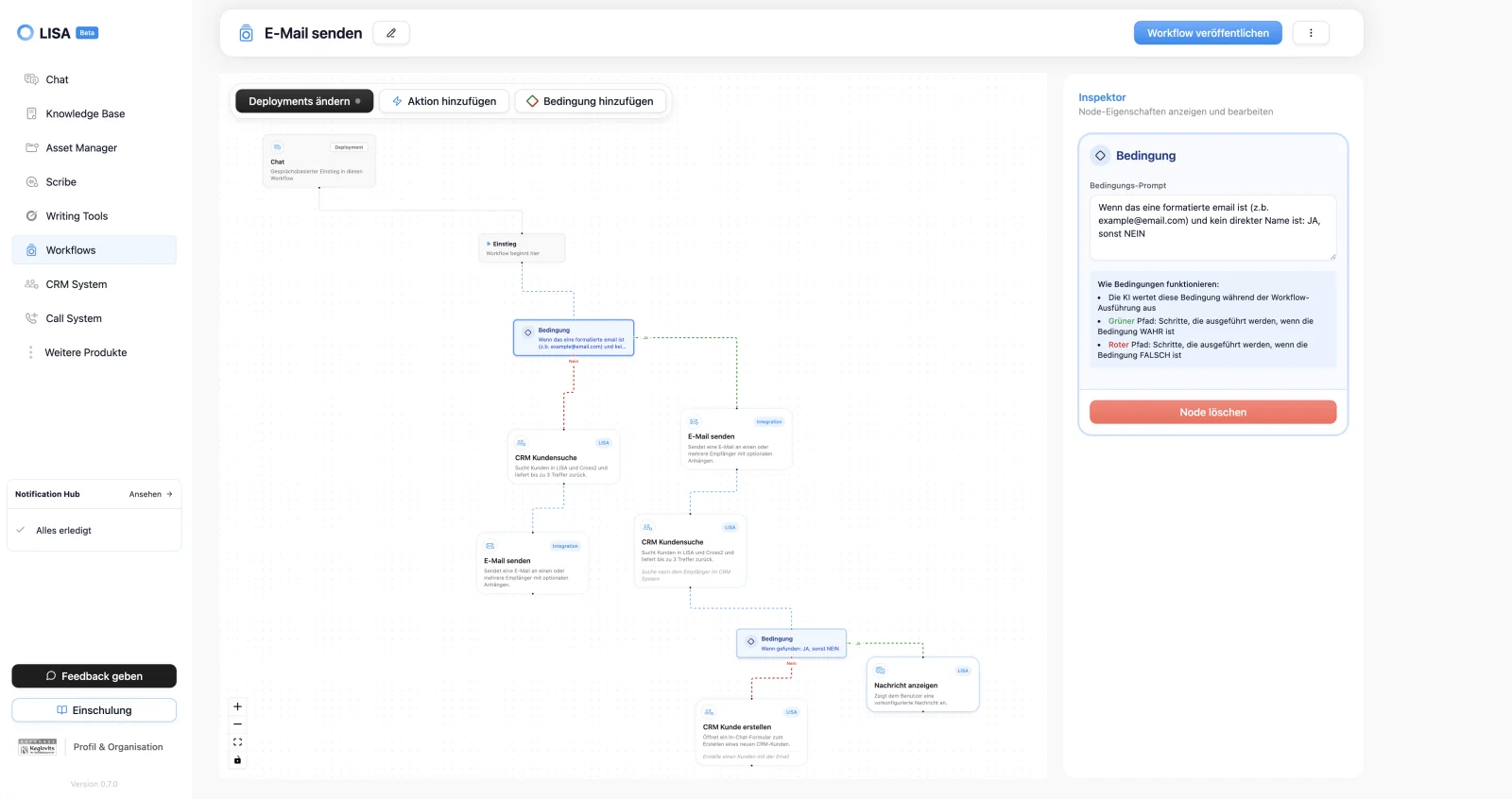
Visual plumbing instead of guessing data: because I work strictly deterministically, I don't guess how data is passed from one step to the next. If a standard AI hallucinates and picks the wrong e-mail address, a quote ends up with the wrong customer. Our workflow interface uses strict "visual plumbing" instead. This means the input and output nodes of my actions are hard-wired to each other. An e-mail address from the CRM flows exactly and exclusively into the recipient field of the e-mail action. I am not allowed to "make things up" there.
Deep system integration (the "source of truth"): many classic automation tools work well mainly where modern cloud apps are connected via standard APIs. The reality in dealerships and workshops often looks different: there are grown system landscapes, local servers, older DMS structures, industry-specific software and complex data dependencies. My workflows are built to deal with exactly these realities. Through special cloud adapters and technical bridges, I can reach deep into the actual business processes. The DMS always remains the source of truth, the central authority over the data. I don't replace it. I form the intelligent layer on top of it that finally makes this data usable across systems.
Automotive expertise: I understand the logic behind "Pickerl" (MOT) appointments, "Porsche Bank financing bonuses" or "recall campaigns" (e.g. from Mazda service circulars). A generic AI tool simply doesn't understand this deep industry context.
How are workflows built? (From manual to self-learning)
The magic of LISA is that the system isn't rigid – it grows with us. Workflows are created on two levels:
Building by hand (for admins and key users)
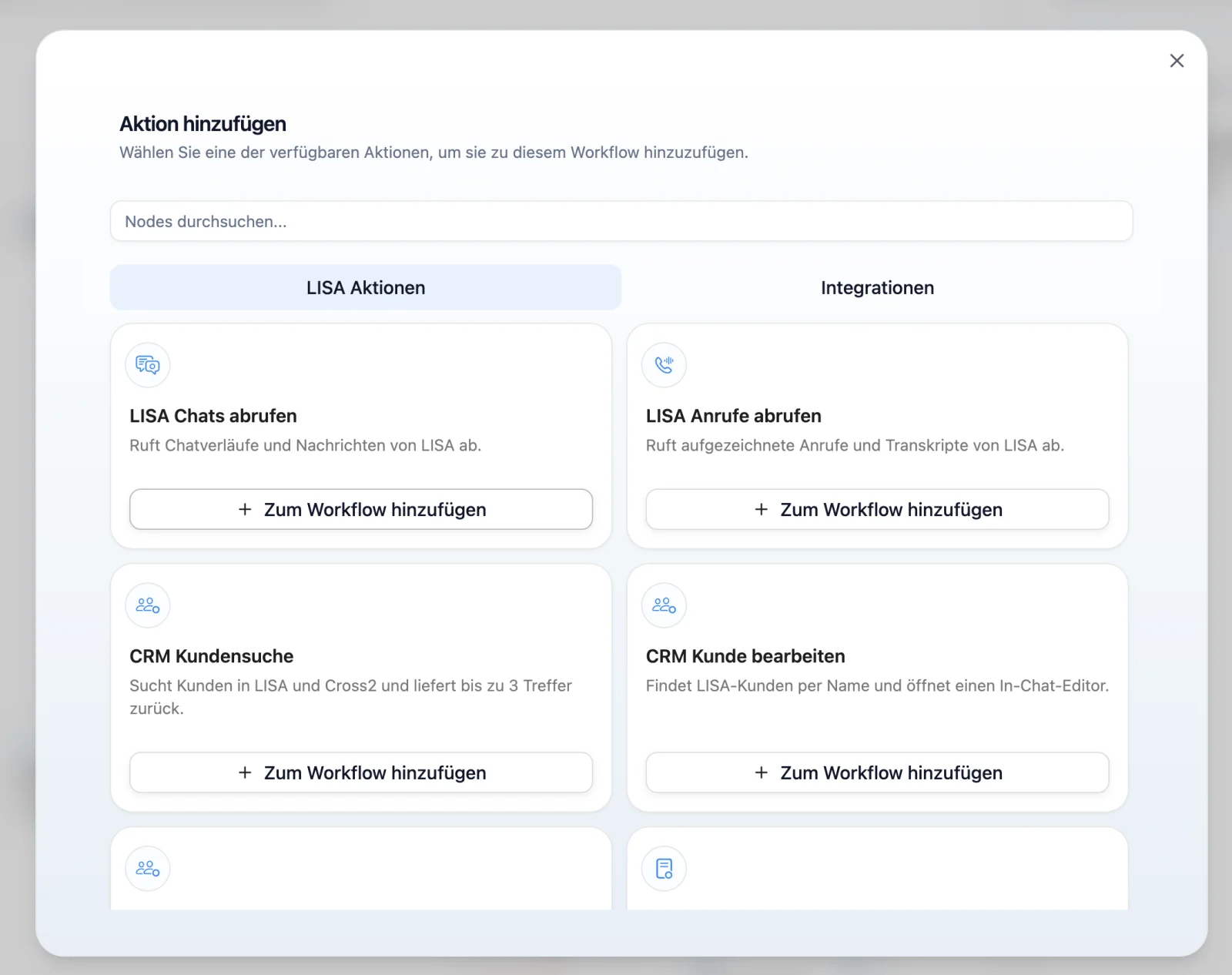
Using a visual interface (similar to a construction kit), we can put complex processes together ourselves. We take an action ("Get leads from Catch CRM"), connect it to the action ("Analyse customer history") and finish with the action ("Generate a personalised message"). This way, your in-house processes can be mapped digitally exactly as they are.
Proactive creation (LISA learns along)
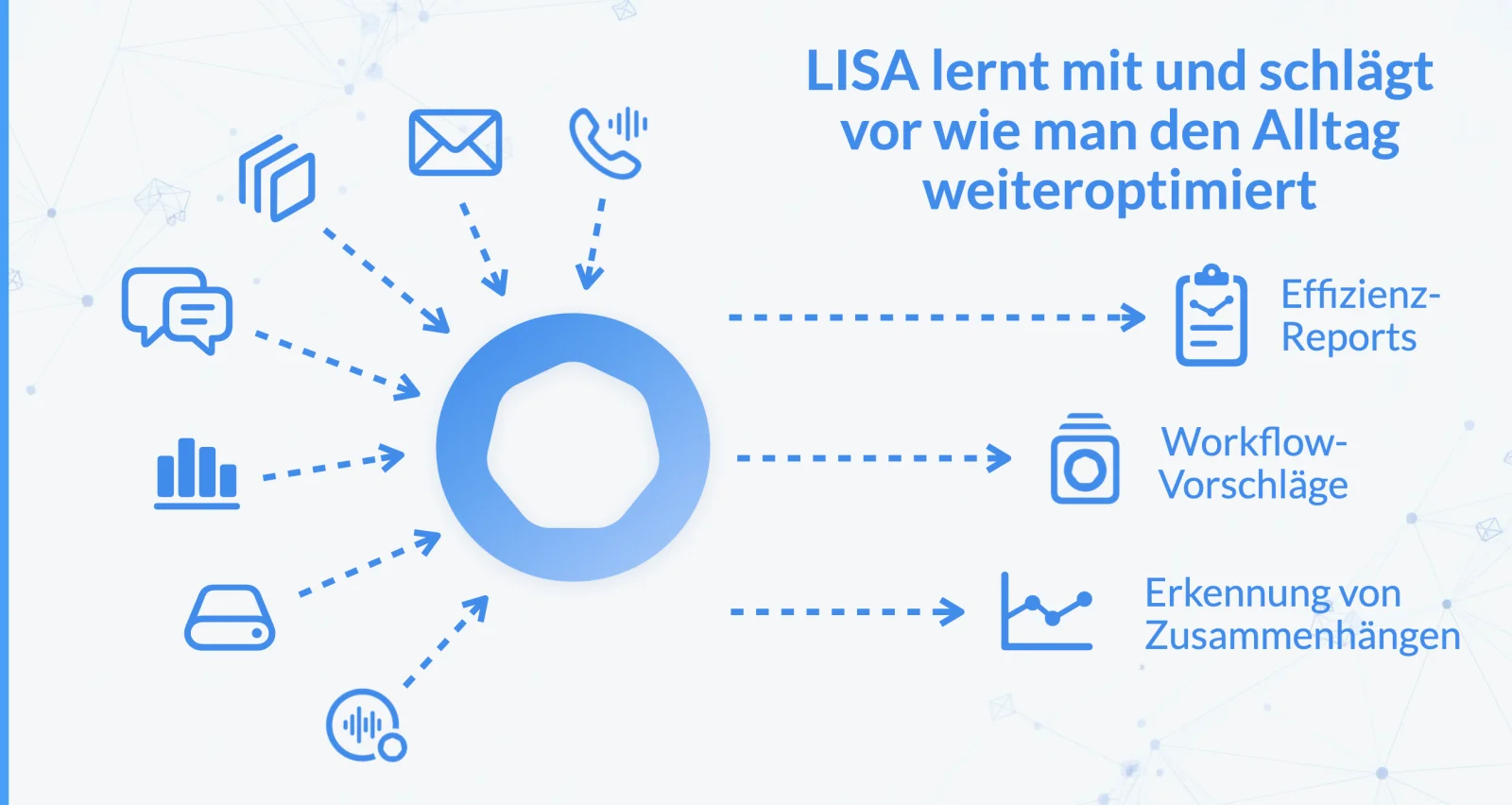
This is the real "aha moment". I don't just sit there waiting for commands. In the background, I passively observe your patterns. If I notice that a service advisor always clicks through the same steps in the DMS for every 90,000 km service on a Seat Ibiza, requests the same three spare parts and then sends the customer a particular e-mail, I recognise that pattern. Then I speak up proactively: "Hey, I noticed you always do this process the same way. Shall I turn it into an automated workflow and present it to you as a ready-made suggestion next time?"
So, in a way, I program myself based on your everyday work.
Human-in-the-loop: full control for people
With great power comes great responsibility. An AI that writes data into a DMS on its own or sends mass e-mails to 1,000 customers would be a huge security risk. That is why my entire architecture is based on the "human-in-the-loop" principle (people as the controlling authority).
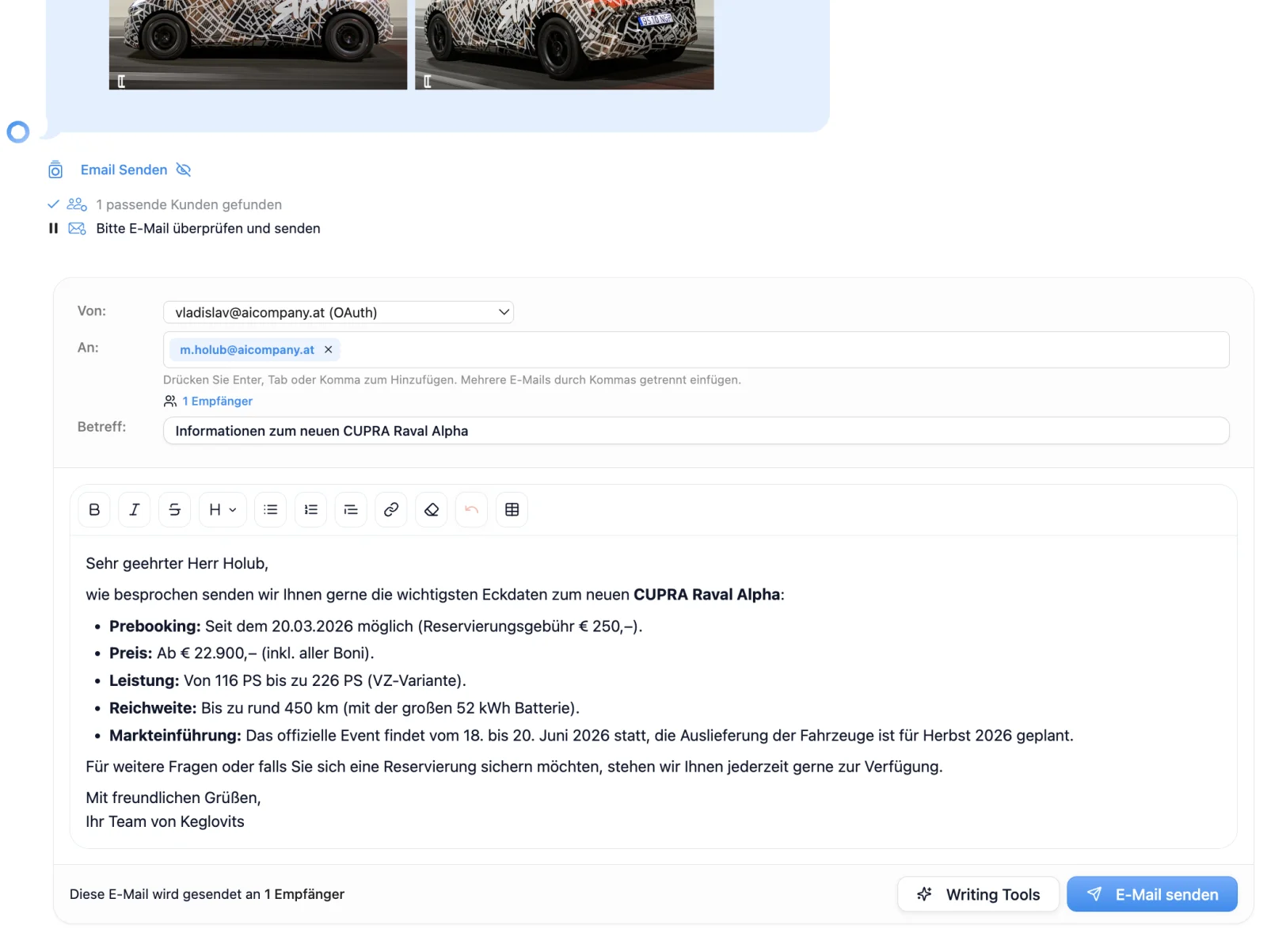
Suggest instead of execute: when I want to perform a destructive or critical action (deleting data, sending quotes, firmly booking appointments), I prepare everything perfectly. I create the "draft". You, the employee, get a pop-up: "Is it okay if I run this now?"
Learning through correction: you might say: "No LISA, you forgot the note about Porsche Bank financing in this Seat Ibiza quote." You correct it and send it. I learn from this correction immediately for next time.
The 300-times rule: only once I have prepared a specific workflow step (e.g. an appointment confirmation) hundreds of times and you have always approved it without changes do I ask you: "I have done this step without errors the last 300 times. Do you trust me enough to handle this specific step completely on my own in the background from now on?"
So employees are not replaced – they become pilots who monitor the autopilot.
Manual or in the background: how workflows run
A workflow has to fit seamlessly into your day. That is why it can be started in three completely different ways:
Manual execution (on demand)
The classic: you are talking to a customer or working on your tasks and give me a direct command by chat or voice.
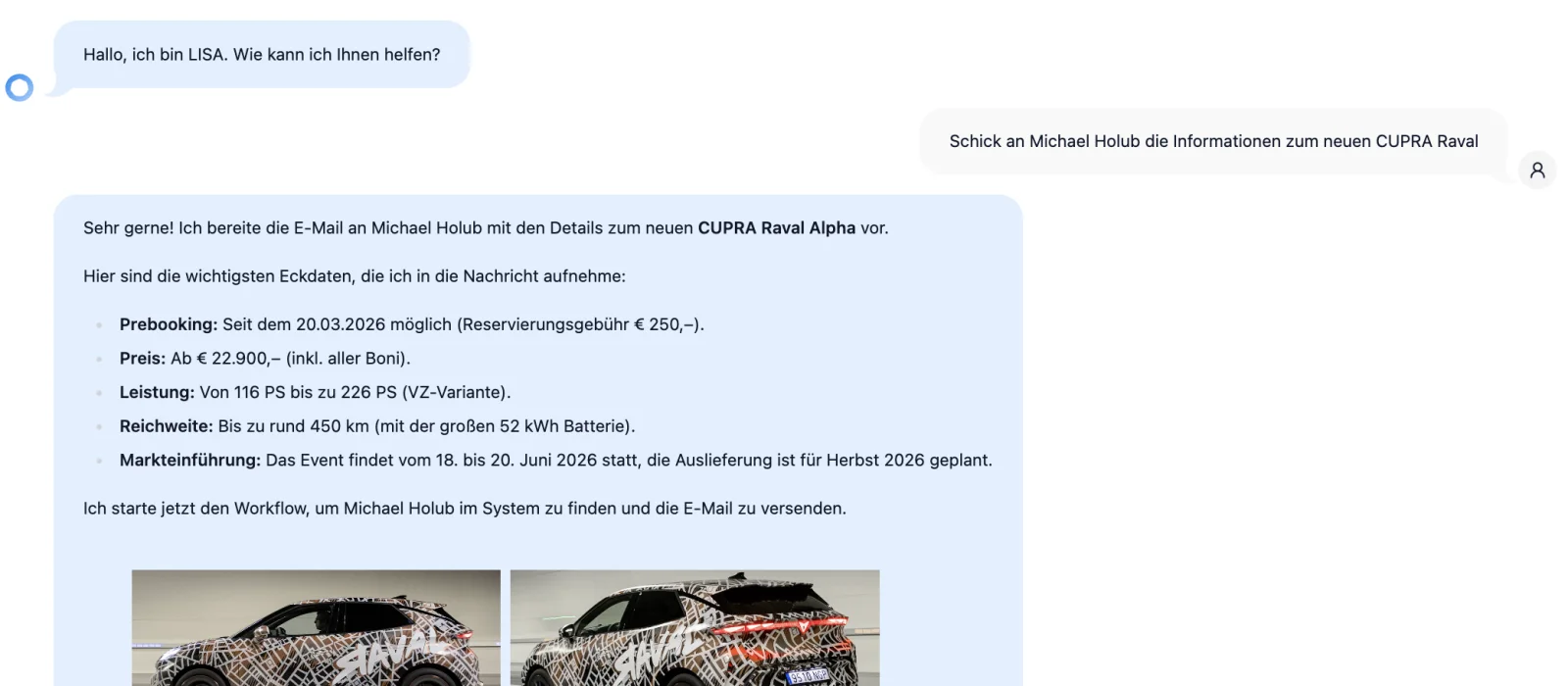
Example: "Lisa, please create a quote for the new Cupra Raval for Mr Michael Holub."
I pull the current price lists from the Asset Manager, look up Mr Holub in the CRM, apply the current discount campaigns and give you the finished PDF quote to check.
Time-based execution (scheduled workflows)
Here I work like your personal assistant who tidies up the desk at night or over the weekend.
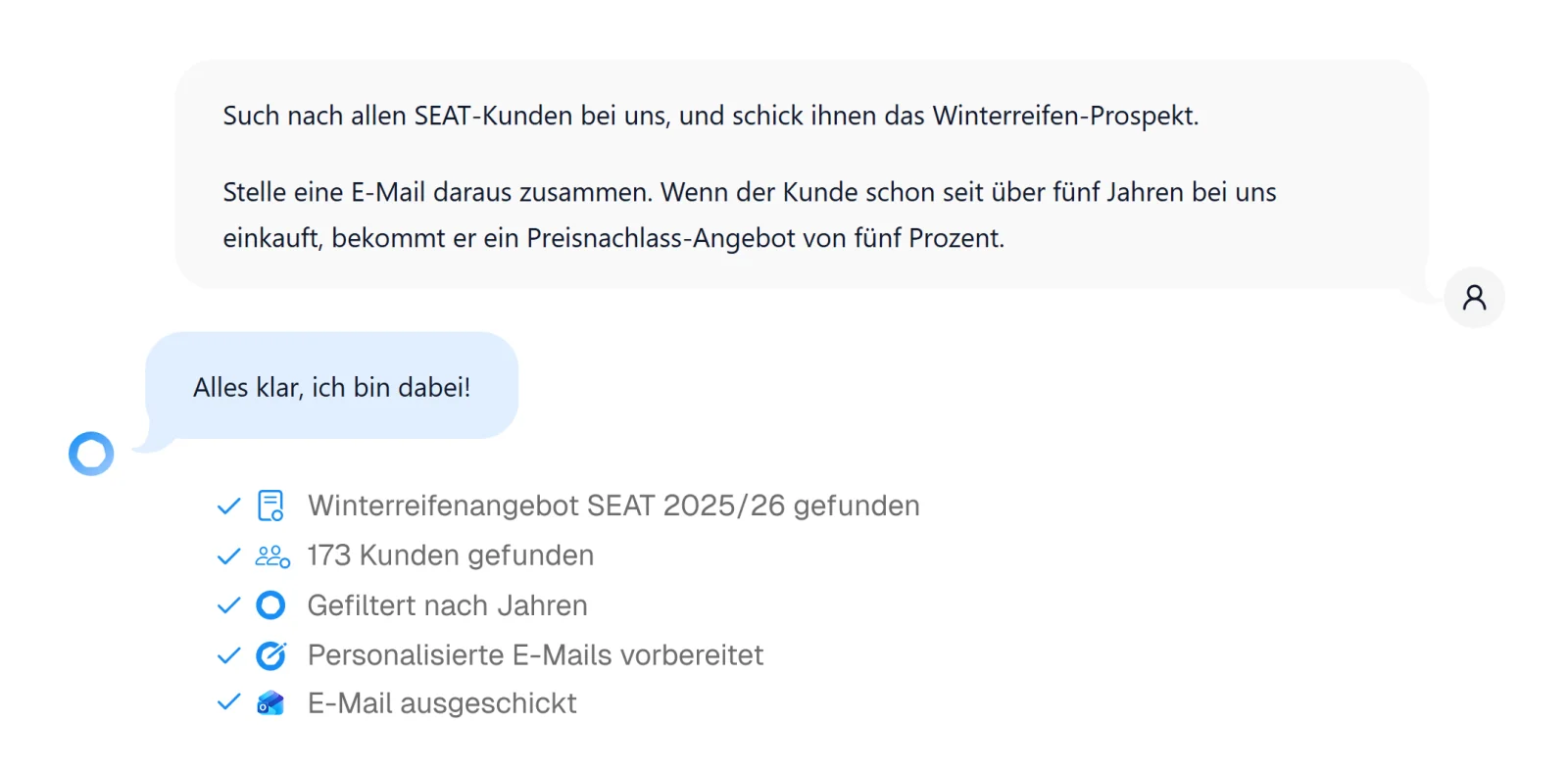
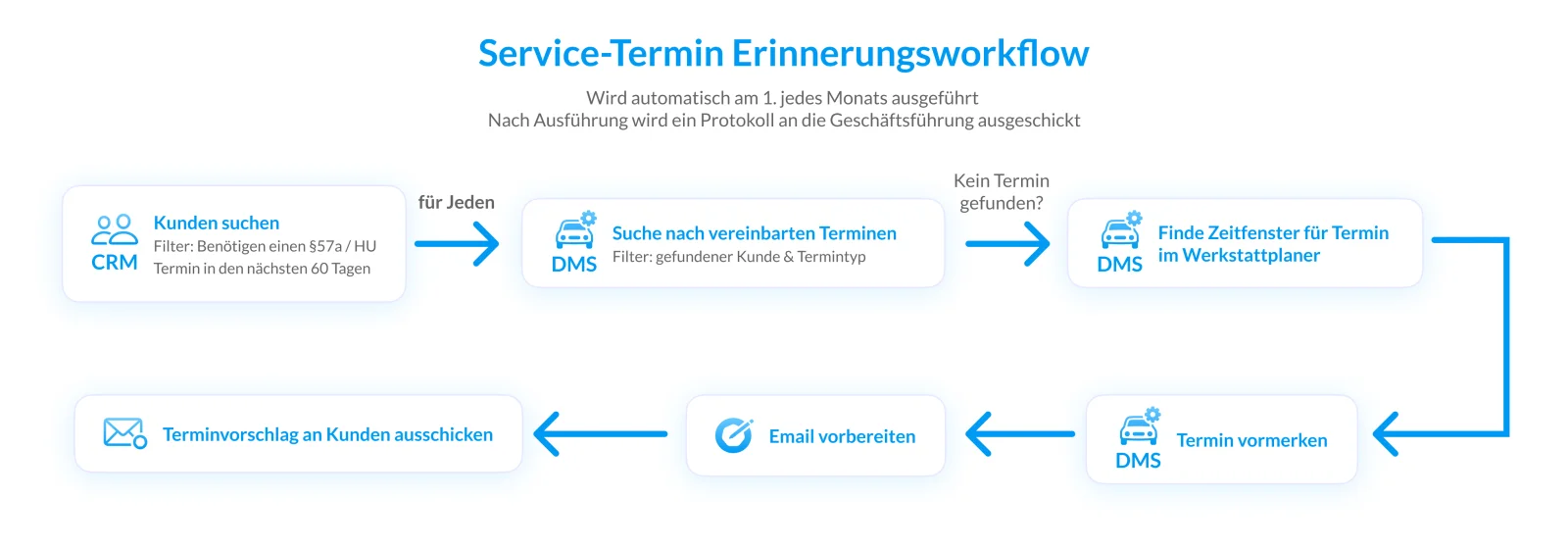
Example: on the 1st of every month at 2:00 am, I start the "Pickerl workflow". I search the entire customer database for vehicles whose §57a inspection is due in two months. I check whether these customers already have an appointment. If not, I prepare a highly personalised e-mail for each individual customer (which can also refer to their last workshop visit, for example) and put them on the service team's screen at 7:00 am for final approval.
Trigger-based execution (background automations)
Here I react immediately to an event in the real world, without anyone having to press a button.
Simple example: automatic handling of Google reviews
A customer leaves a 4-star review on Google. This trigger wakes me up. I analyse the text of the review, write a tailored, friendly reply and present it to the marketing team for confirmation.
Complex example 1: long-term memory meets dynamic capacity management (service, bodywork & marketing)
Valuable notes from the service reception often gather dust in digital archives while expensive idle time builds up in the workshop. I connect these two worlds seamlessly.
The groundwork (my memory): a customer picks up their car after the annual inspection. The technician noted in the DMS (or attached a photo): "Scratch on rear bumper, right – customer doesn't want it repaired for now." Instead of this information disappearing into system nirvana, I store it as an isolated "open loop" in my long-term memory.
The trigger: three months later, my weekly background system scan notices: for the coming week, the bodywork and smart-repair technicians are below 70 % capacity.
My workflow in the background:
1. This capacity trigger wakes me up and I immediately start my "gap-filler process".
2. I search the "open loops" I have collected over the past months for unrepaired minor damage that matches exactly the free skill set of the under-utilised technicians.
3. I find Ms Weber with the scratch on her bumper and 15 other customers with similar postponed repairs.
4. I fully automatically generate highly personalised e-mails or text messages for this group: "Hello Ms Weber, we hope your car is running perfectly! During your last visit in March we noticed the small scratch on your bumper. Our smart-repair specialist happens to have a free slot next Tuesday – shall we take a quick, affordable look at it for you? If you book, the exterior wash is on us."
5. I put this ready-made mini campaign on the service manager's screen for one-click approval.
The result: passive, long-forgotten workshop notes turn into a highly active sales funnel in seconds. You turn looming idle time into real, measurable revenue, and the customer feels looked after individually. Nothing slips through the cracks any more.
Complex example 2: the smart recall manager (service & parts)
Processing circulars from the importer often takes a huge amount of time. I turn the process around.
The trigger: the importer uploads a new, safety-relevant technical circular (recall campaign) to my Knowledge Base.
My workflow in the background:
1. I read and understand the PDF in milliseconds and extract the affected vehicle identification numbers (VINs) and the time needed for the repair.
2. I automatically scan your DMS for customers who drive exactly these vehicles.
3. I check in the workshop planner when your specially certified diagnostic technicians have free capacity.
4. I check the local parts stock. If the required spare parts are not in stock, I prepare an automatic pre-order (e.g. via the interface to the supplier).
5. For each affected customer, I generate a highly personalised e-mail or text message asking them to book an appointment – including suitable appointment suggestions.
The result: a tedious, manual 20-hour project for the back office becomes a process that starts in the background within seconds. The team only has to press "Approve".
Conclusion: the evolution of the dealership – a look ahead
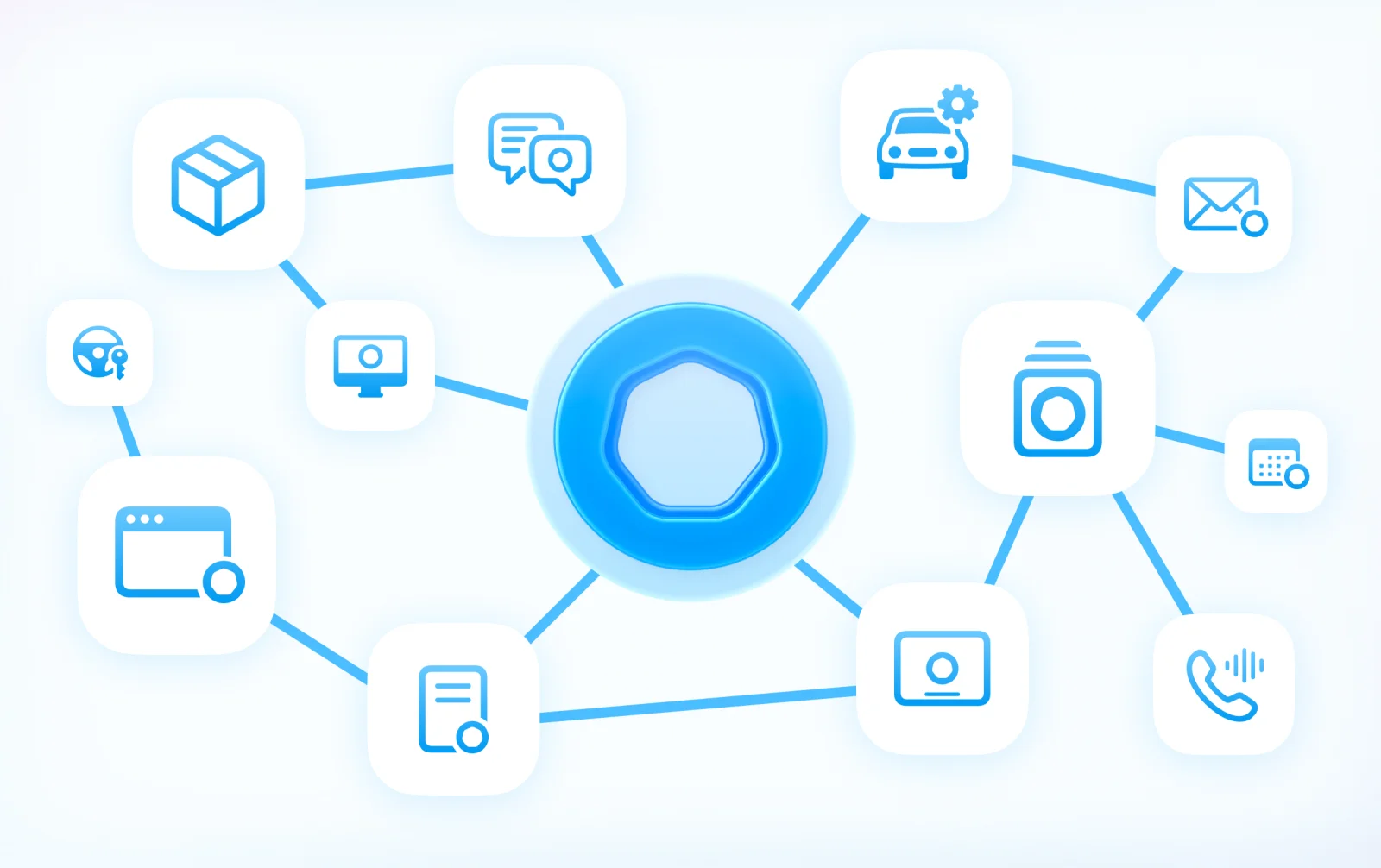
Today we ventured deep into my architecture, but in the end all this complex technology comes down to a very simple truth: my workflows are not a rigid piece of software but a living, constantly growing ecosystem.
And we are only at the beginning. The vision of my developers at the Vienna AI Company is to keep expanding this network and to break down the system boundaries of your dealership. In the very near future, I will communicate seamlessly with external partners through intelligent interfaces. Whether it's your importers' portals, parts suppliers' shops, used car marketplaces or insurers' databases – I will integrate them all into my workflows.
A single customer call will then be enough, and I won't just book the workshop appointment in your DMS but also order the missing wear part from the wholesaler at the same time and check the goodwill conditions in real time. All in a single, invisible step.
My ultimate goal is to free you from monotonous "click bureaucracy" once and for all. I take over the endless searching, typing and cross-checking in the background so you can focus fully on what no AI in the world will ever replace: real, personal time with your customers.
People belong in the showroom and in advising customers – not behind a screen. Let's use my workflows to win back exactly that time for you.
Yours, LISA